
-
Posted in : BookCard WP
-
Hello. AFTER UPDATING TO VERSION 4.5 the contact form is still not working.
IT WILL NOT SEND THE MESSAGE. You reply to everyone that it’s working for you, but clearly it’s not working for lots of people. Please take a look at your documentation and make sure it’s correct, because I copied and pasted directly from there and it does not work.
Obviously, this is an important part of the website for anyone using this theme, so having this resolved ASAP would be greatly appreciated.
I have tried on Firefox, Safari and Chrome.
Thanks.
Hello. Thanks for replying.
I have contacted my server people and they said that the PHP mail() function is not a problem with the server (Byethost).
Perhaps this is a simple issue where I’ve set something up wrong, despite following the instructions in your documentation file? Any further help would be greatly appreciated. My url is katiesexton.ca
I forgot to mention that I am using Gmail for my email address.
I will try to improve the contact form. At this time, you can use the Contact Form 7 plugin for a temporarily solution. If you want to use the SMTP way to send mails, then use additionally a smtp plugin listed below:
WP Mail SMTP: http://wordpress.org/plugins/wp-mail-smtp
Easy WP SMTP: http://wordpress.org/plugins/easy-wp-smtp
WP SMTP: http://wordpress.org/plugins/wp-smtp
Configure SMTP: http://wordpress.org/plugins/configure-smtp
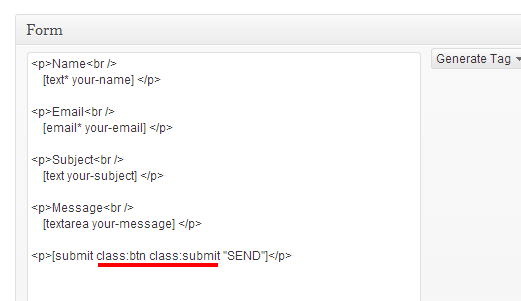
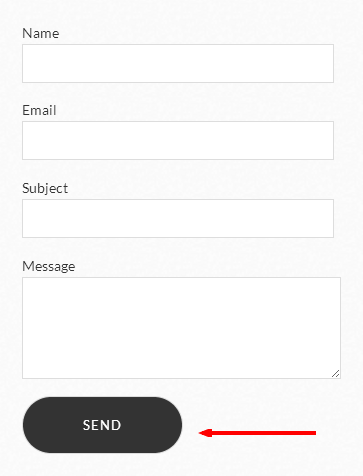
– If you want to see the same submit button style, then edit the contact form 7:
<p>Name<br />
    [text* your-name] </p>

<p>Email<br />
    [email* your-email] </p>

<p>Subject<br />
    [text your-subject] </p>

<p>Message<br />
    [textarea your-message] </p>

<p>[submit class:btn class:submit "SEND"]</p>
See in the images:
Did you get to fix the contact form? Mine doesnt seem to work as well over at http://www.fskogsrud.com, do you see what could be the issue?
You can try Contact Form 7 plugin.
Hello,
Please let me know if I should start my own thread. I am also having issues with the contact form. I installed and activated Contact Form 7 plugin but it still doesn’t work. URL is http://www.jenniferbillock.com. Please advise!
JenHi, please update to the latest version. You can download it from ThemeForest.
Thanks
The latest version will not install. I continually receive a WordPress error: “Are you sure you want to do this?” and then it fails every time.
It is about your server configuration. This theme’s file size is about 10MB. Some servers default come 8MB upload limit. That cab be increased. You can contact your host or upload the theme manually via FTP.
did you guys resolved the issue with the contact form?
I have updated to the latest WP 4.7.5
and my contact form just won’t send the email.thx guys.
I tried using Contact Form 7 and Math Captcha.
Install those two plugins.Create the link and copy and paste on your Contact Page the code at the bottom.
[contact-form-7 id="293"]
So your code should look like this.
[contact_form_wrap]
[letter_wrap]
[letter_info]
Johhny Doe
johhny@gmail.com
– Planet Earth
[/letter_info]
[stamp alt=”Johnny Doe” url=”http://themes.pixelwars.org/bookcard-wp/wp-content/uploads/2013/04/stamp-image.png”%5D
[/letter_wrap]
[contact-form-7 id="293"]
[/contact_form_wrap]That still does not work. I think I will just remove the contact form altogether and put my email there alone. It’s too buggy and I don’t want to risk not getting messages from potential clients.
The contact form improved. New version is available on ThemeForest.
Hi there, also for me, the contactform is not working.
Can someone please help me out?!
I installed several SMTP plugins, the test emails are working, but yet, no form can be send through the website.
Mehmet stated in 2013 he would try to fix it and in 2014 that the contact form was improved, but yet, I don’t get it working!
Look forward to hearing the solution!!
Hi, your host may have disabled the mail() function. It must be enabled on your server.
Thanks
Hi, I cannot for the life of me get my cf7 to work on urbandystrophy.com
I’ve probably sent over 20 emails tonight trying to test it….I’ve used a hotmail.com email and a ymail.com email. No emails are going through even though it says it’s sent. I need it to send to a hotmail email.
Help please :(


You must be logged in and have valid license to reply to this topic.