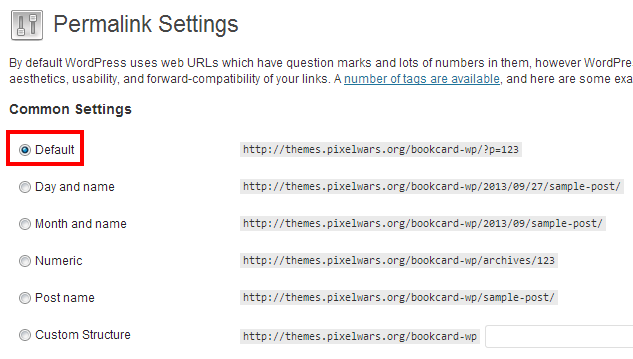
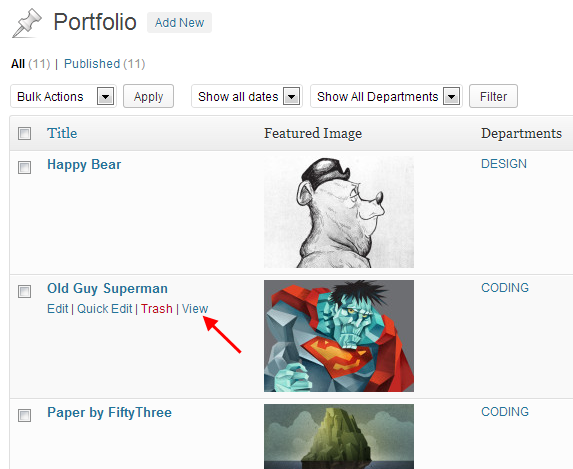
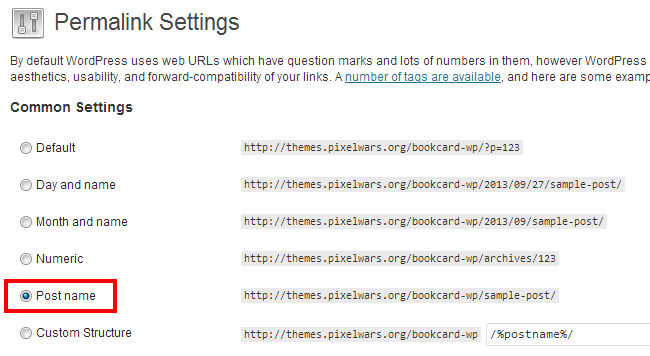
Portfolio pages do not show Posted in : BookCard WP lenashanaevaParticipant 25 September 2013 at 23:52 #8931 I try to edit portfolio pages. I see the code on the page – but when I press preview page – error not found is shown. If I try from the life site – I see blank page. http://www.lenashanaeva.ru Mehmet S.Keymaster 27 September 2013 at 17:55 #8955 Hi, 1- Select default option from permalink settings, 2 – Check your portfolio items by clicking the View link, 3 – If ok, then select the post name option again. In images: 1 – 2 – 3 – lenashanaevaParticipant 28 September 2013 at 12:37 #8995 Hi! Thank you very much. When I put the settings to default – it goes ok, I can see the portfolio page. If I turn again to Post name – doesn’t work as before. Mehmet S.Keymaster 1 October 2013 at 23:51 #9085 Try again please. lenashanaevaParticipant 3 October 2013 at 14:06 #9124 Still the same – switch to post name and see blank pages. Mehmet S.Keymaster 4 October 2013 at 20:18 #9142 Send your login info, i will check. http://www.pixelwars.org/contact/ Mehmet S.Keymaster 4 October 2013 at 22:25 #9144 Hi, activated the post name option and a .htaccess alert appeared. It is a server related message. Please contact your host. Thanks lenashanaevaParticipant 6 October 2013 at 10:21 #9165 Thank you, Ill try that. Viewing 8 posts - 1 through 8 (of 8 total) You must be logged in and have valid license to reply to this topic. License required for the following item BookCard WP - 3D Folded vCard WordPress Themeby pixelwars Login and Registration Log in · Register