
-
Posted in : Responsy WP
-
I’m using Responsy WP to create a Webpage for a Journalist. But he wants to have 3 other guys as columnist.
To solve that I created a category for each one of the columnists. And added as a menu sub item.
But I dont want this categories to show in “From the blog” and in the blog as well. I want this category would only select the itens under its name, and appear only when someone clicks in the sub item of the menu with the name of the category.
How can I do that?
Hi,
1 – Exclude Categories (From The Blog):
– go to Appearance > Editor > functions.php.
– find this line:
$args_recent_posts = array( 'post_type' => 'post', 'posts_per_page' => $number_of_posts_to_show );
– edit:
$args_recent_posts = array( 'post_type' => 'post', 'posts_per_page' => $number_of_posts_to_show, 'cat=-12,-34,-56' );
2 – Exclude Categories (Blog page):
– go to Appearance > Editor > index.php.
– find this:
<?php
if ( have_posts() ) :
– edit:
<?php
query_posts( 'cat=-1,-2,-3' );
if ( have_posts() ) :
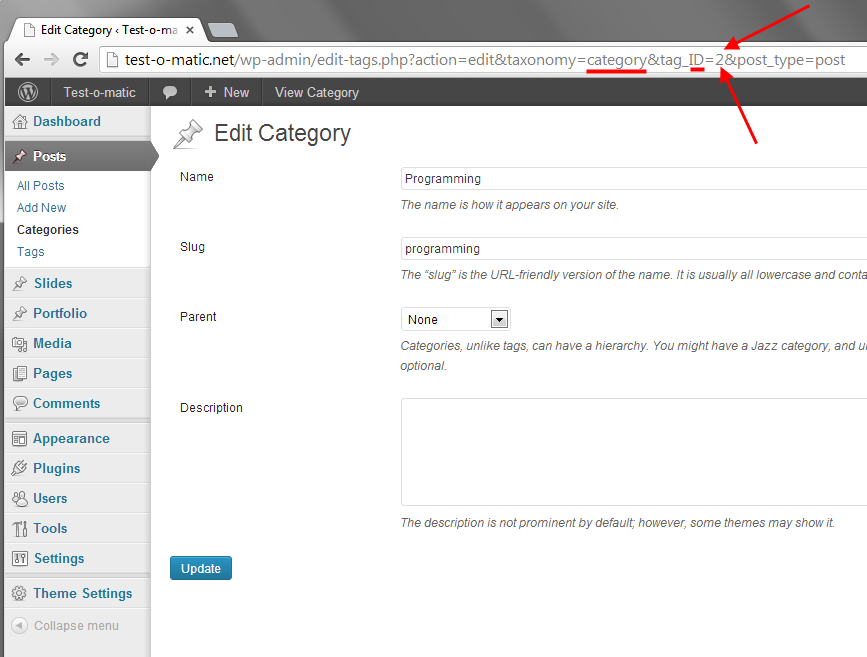
Note: The numbers are category ids. You can find a category id in your edit screen.
See in the image:
Thanks, but when I go to “editor>functions.php” there is no caracter on this file, the editor shows just a blank page.
You can edit the files in another way.
– Go to your FTP, then edit the files.
OR
– Unzip the theme, then edit the files.
So, it worked . But the categorys still appear on the widget “from the blog”. How do I do, since I dont want this categories on the home page as well?
Did you include the unwanted category ids to the code? The numbers in my code are samples. They are not yours.
I did that. Checked my categories ID’s, and replaced your numbers. At the Blog page I don’t see the categories, but they appear on the Home page on the widget “From the blog”.
Hey, it is ok now, use this:
$args_recent_posts = array( 'post_type' => 'post', 'posts_per_page' => $number_of_posts_to_show, 'cat' => '-12,-34,-56' );
Thank you so much. It worked. Sorry to trouble you. :D


The forum ‘Responsy WP’ is closed to new topics and replies.