– Create a new page with name portfolio and select it from the portfolio widget.
– Create a custom menu,
– Add a custom link to the menu for the portfolio page from the Custom Links box ( not Pages box ),
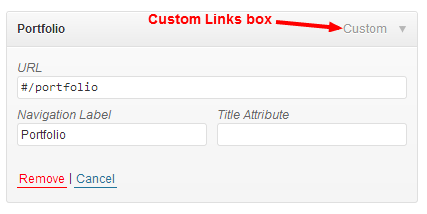
– in the Custom Links box, write Portfolio ( or what you define for your portfolio page title ) to the Label input, then clear the URL input and define a special url for your portfolio page in the URL input which begins #/ after that write your portfolio page’s slug name.
For example:
– my portfolio page’s name is Portfolio and its slug name is portfolio, so the special url must be #/portfolio
– to learn the right slug name of a page, go to Pages > see page list > find your wanted page row > click Quick Edit link > copy the slug name of the page from its input where right side of the slug title.
Final product is:
Viewing 4 posts - 1 through 4 (of 4 total)
The forum ‘impressivCard WP’ is closed to new topics and replies.