Hi, so I have the 4 blocks (about me, resume etc) and they all have a tagline underneath their titles, like “Get to know about me and more”. I cant find this anywhere in the editor!! Where can I change or remove these taglines?
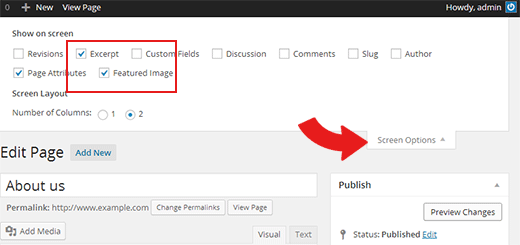
Hi, If you don’t see the Excerpt meta box when editing the page, then you need to enable it. Click on the Screen Options button on the top right corner of the screen. A fly down menu will appear, and you need to simply check the box next to Excerpt.
Now scroll down to the excerpt meta box which is below the post editor.
Thanks
Viewing 4 posts - 1 through 4 (of 4 total)
You must be logged in and have valid license to reply to this topic.