Option to disable featured image

  • Posted in : Bloggy WP
  • DirtyRobot1
    Participant

    Hi!

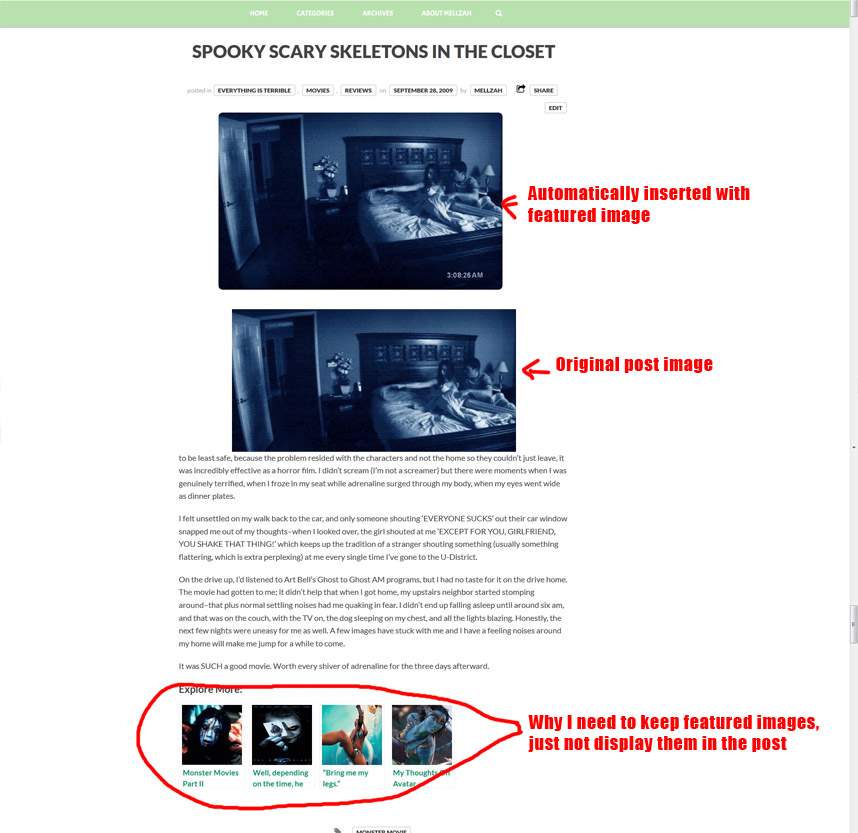
    I recently installed Yet Another Related Posts Plugin to direct visitors to related blog posts. This prompted me to install the Auto Post Thumbnail plugin which generates a thumbnail and featured image for each post so a photo appears with each of the related posts suggestions. Unfortunately, setting a featured image puts the image at the top of every post, which I absolutely don’t want. All of the research I’ve done indicates that the option to turn off featured images should be in the theme editor, but I don’t see this in Bloggy. How do I turn off the automatic insertion of the featured image?

    I hope this makes sense, here’s a picture if that will help explain what I’m talking about:
    http://www.mellzah.com/wp-content/uploads/2014/06/featuredimage.jpg

    Thank you for your time!

    Mehmet S.
    Keymaster

    Hi, use this in your Theme Options > Style > Custom CSS field:

    body.single-post .featured-image {
    	display: none;
    }
    

    Thanks

    DirtyRobot1
    Participant

    I put that in there and saved, but it didn’t work?

    ahmetsali
    Keymaster

    Hi, you have a syntax error in your custom css code, please check it again, and make it same as here.

    DirtyRobot1
    Participant

    I’ve copy/pasted the code snippet shown but it still doesn’t work, unfortunately.

    ahmetsali
    Keymaster

    use this one;

    .featured-image {
    	display: none;
    }
    
    DirtyRobot1
    Participant

    That worked, thank you so much!

Viewing 7 posts - 1 through 7 (of 7 total)

You must be logged in and have valid license to reply to this topic.

License required for the following item
Login and Registration Log in · Register