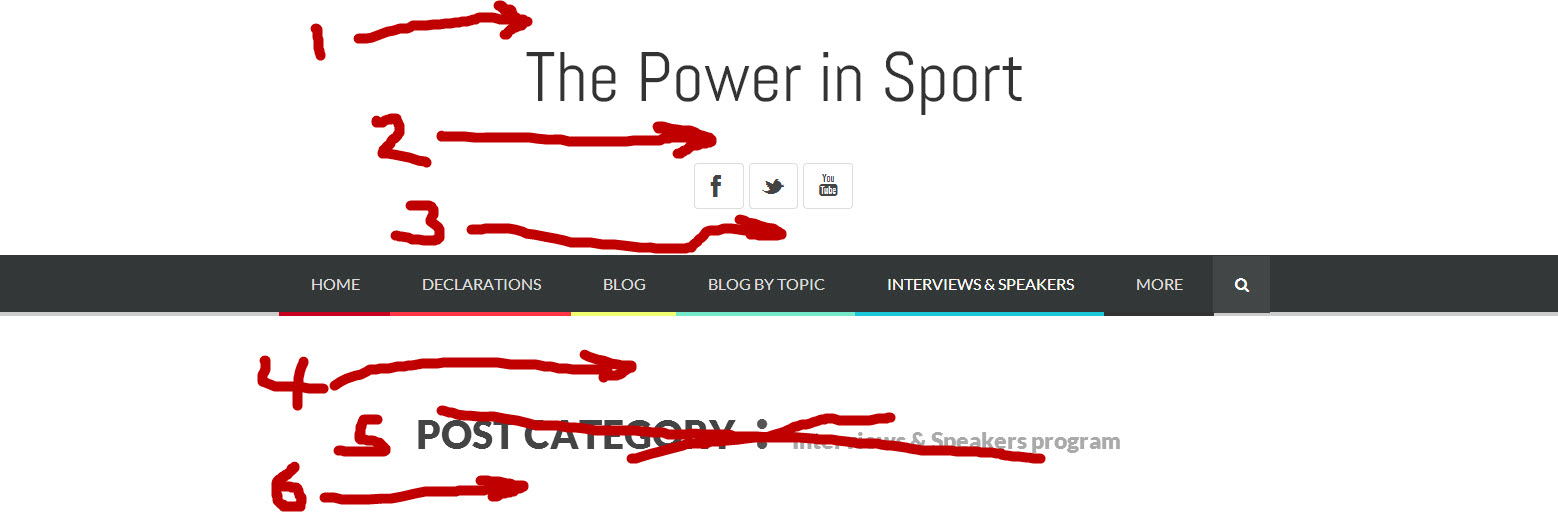
reduce spacing for header and blog Posted in : Bloggy WP ldianoParticipant 16 January 2014 at 20:43 #11534 For this screenshot, can you advise me how to reduce the spacing for area 1, 2, 3, 4, 6 For #5 How do we remove the text that says “Post Category:” while leaving the specific category name (ie ‘Interviews & Speakers’) http://thepowerinsport.com/wp-content/uploads/2014/01/screenshot-of-website-home-page-for-PIXELWARS-guys-Jan-16-2014.jpg You have provided me with some of the answers before and I appreciate you providing them here again. Thank you. Mehmet S.Keymaster 16 January 2014 at 22:01 #11536 Hi, use these in your custom css field on your theme options: – for reducing: .site-header hgroup { padding-top: 0px; padding-bottom: 0px; } .site-header hgroup h1 { margin-bottom: 0px; } .site-header hgroup .site-description { margin: 0px; } .site-header ul.social { margin-bottom: 1em; } – removing the category name: body.category-speakers-program .page-header { display: none; } Note: Read read colored words from your url. ldianoParticipant 25 January 2014 at 23:37 #11832 Thank you. Sorry for my delay in replying. How do we remove the category name for ‘all’ pages? Thanks, Mehmet S.Keymaster 26 January 2014 at 18:12 #11844 body.category .page-header { display: none; } ldianoParticipant 26 January 2014 at 18:35 #11846 Thanks. It leaves a big area of white space. How to shrink it? ahmetsaliKeymaster 30 January 2014 at 00:09 #11937 Hi, try this custom css; .category .post-archive .hentry { padding-top: 0; } wpaskParticipant 16 February 2014 at 12:06 #12378 Hi, I have a similar problem with my webpage. Where exactly do we plug the custom css code into? ahmetsaliKeymaster 16 February 2014 at 22:50 #12383 Hi, paste the custom css code to “Appearance > Theme Options > Style > Custom CSS field “. Viewing 8 posts - 1 through 8 (of 8 total) You must be logged in and have valid license to reply to this topic. License required for the following item Bloggy WP - Responsive Minimalist WordPress Themeby pixelwars Login and Registration Log in · Register