
-
Posted in : Energi
-
Hello. Our home page is showing with a white header instead of a transparent header as per your theme/demo. I’ve read similar topics in here but I can’t see ‘header styles’ on the page settings (or any page settings for that matter). Please advise. Thanks
Hi,
Thanks — and the good news is the option is there; it’s just in a part of the editor that’s hidden on your screen right now.
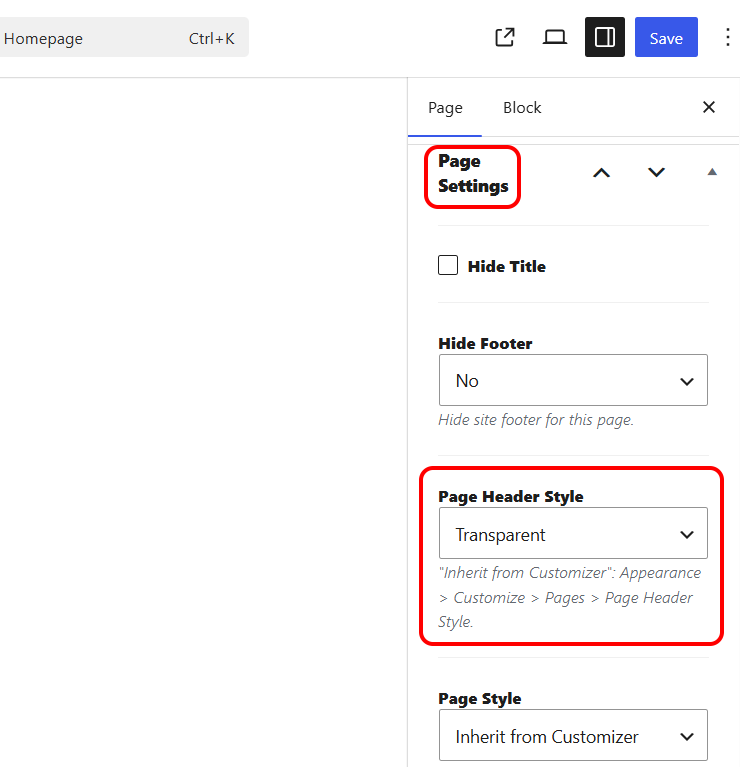
The transparent header is set per page through a dropdown called “Page Header Style”, which you’ll want to set to “Transparent” on your homepage. Here’s how to reach it:Open your homepage in the standard WordPress editor (this particular setting lives in WordPress itself, not in the Elementor panel).
At the top-right of the editor, click the Settings icon — the square panel icon next to the three-dot menu. This opens the settings sidebar, which is the part you’re not seeing at the moment.
In that sidebar, make sure the “Page” tab is selected (rather than “Block”).
Scroll down and you’ll find “Page Header Style” — set it to Transparent.
Click Save.That’s the whole fix — once the settings sidebar is open, the dropdown is right there.
If you’d rather set it for the whole site at once, there’s also a global version under Appearance → Customize → Pages → Page Header Style.
If it still doesn’t appear after opening the settings sidebar, send me a screenshot of your edit screen and I’ll take it from there.
Thanks,Serkan
Thank you but the ‘Page Header Style’ option/item is not in the sidebar when I open the settings. Screenshot here as requested.
https://1drv.ms/i/c/5f94d985276ef800/IQBDsUCImytQRrmypYsvwYxzASU0VMMM3NpR0LtDfJFcQK0?e=bMjEfe
Jo
Hi. Are you able to get back to me asap please? You have the admin login if you need it from my original message. Thanks
Hi Jo,
First, I want to apologise — genuinely — for how long this has dragged on. You’ve had to chase it several times over the best part of a week, on something that’s blocking your project, and that’s not the experience you should have had. I’m sorry for the delay and the frustration it’s caused.
On the issue itself, the good news is the cause is now clear. The Page Header Style option — the setting that switches your homepage to the transparent header — is added by one of Energi’s required plugins, and that plugin isn’t currently active on your install. That’s exactly why the option wasn’t showing anywhere in your editor, no matter where you looked. So this was never something missing on your end; the control simply wasn’t being loaded.
I’ve now escalated it to our development team so it’s resolved properly at the source rather than patched around. They’ll confirm the exact plugin and get the transparent header matching the demo. You don’t need to do anything further on your side in the meantime.
I’ll come straight back to you here the moment I have their fix, and I’ll keep it moving so it doesn’t sit any longer. Apologies again for the hold-up, and thanks for bearing with me while we get this sorted.
Best,
SerkanThank you. It has been quite frustrating waiting for a reply as I’m sure you understand. What’s the timeline for this please? I want to ensure everything is in place before proceeding with any more content but also have a deadline. Jo
I can see that my last 2 messages have been removed here? The formatting on our site has gone completely out and I have been waiting days again for an update on the original issue. Please respond today on all matters or advise whether I should be requesting a refund.
Hi Jo,
You’re right on both counts, and I’m sorry.
On your messages: two of your replies were removed from this thread, and that was a technical issue. They shouldn’t have been touched, and it won’t happen again.
On the delay: you’ve had to chase this repeatedly, and I fully understand why you’re weighing a refund against your deadline.
Where things stand:
The transparent header issue is diagnosed — the “Page Header Style” option comes from one of Energi’s required plugins that isn’t active on your site, which is why it never showed up anywhere. It’s now with our developers to fix properly. I’ll have a firm timeline from them and will update you here as soon as possible.
The formatting problem you’ve just mentioned is new to me. Please send a screenshot and let me know when it started; I’ll also check directly using your admin login, and I’m treating it as urgent.
I’d like the opportunity to put both right, but that’s your call given your deadline — and I’ll support whichever way you go. You’ll hear back from me asap regardless.
Apologies again for the wait and for the messages.
Best,
SerkanYou can see the formatting on the majority of pages has dropped out https://staging.r3vtech.com/ – compared to the demo. You could ahve just seen this though? It was OK when I uploaded it and it has dropped without me doing anything to the backend (as have been waiting to hear back from you!).
I will share the login again below…please resolve this today otherwise I will defintely have to request a refund close of play as just can’t wait any more and have lost confidence in the theme/support.
Hi Jo,
I’ve now logged in to your WordPress admin area, identified the issue, and applied the corrected version of the Energi theme directly to your site.
The transparent header option is now available and the header has been restored on your website. https://i.ibb.co/X9D4PMb/Page-Header-Style.png
Please check the site from your side and let me know if everything is now displaying correctly. If you still see the previous version, please clear your browser cache and refresh the page.
We will also publish an official theme update tomorrow so that this fix is included in the latest Energi release.
Apologies again for the delay, and thank you for your patience.
Best,
Mehmet


You must be logged in and have valid license to reply to this topic.