hugort

Forum Replies Created

list of topics you have created till now.

  • hugort
    Participant

    My homepage is: http://www.senhormercado.com.br

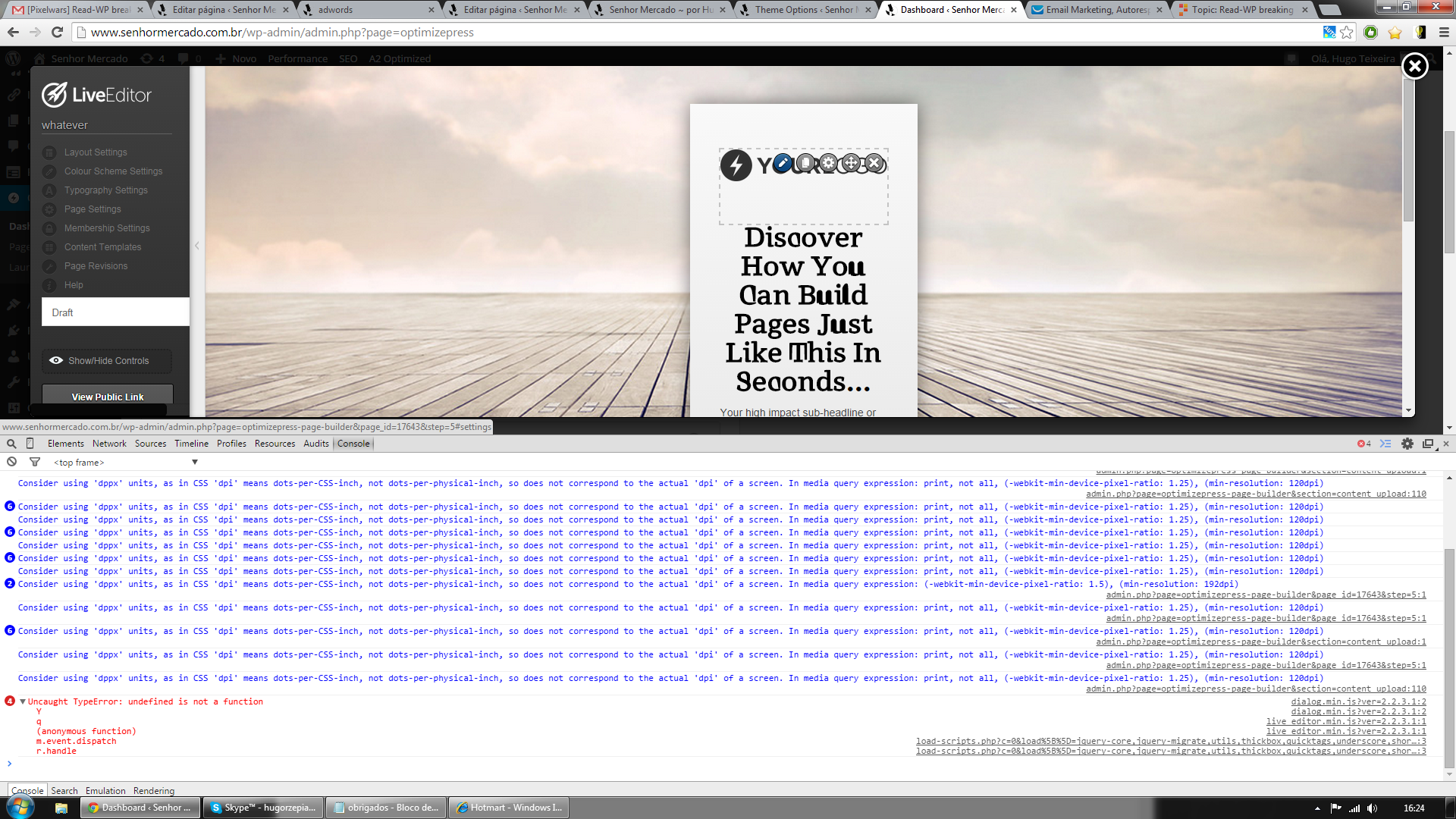
    The problem is that I can’t use Optimizepress’s Live Editor, I click edit (the blue button above Discover How You Can…) as shown in this image right here http://www.senhormercado.com.br/wp-content/uploads/error.png, then I get this “Uncaught Type Error” everytime I try to edit something.

    I also found those two lines referring to read-wp in the source code of this image page, which is wp-admin/something…

    I find this odd because it’s just the wp-admin page, then why is it trying to load the read theme?

    Considering it’s a wp-admin problem, maybe if I manage do completely disable wp-read in this page only http://www.senhormercado.com.br/wp-admin/admin.php?page=optimizepress then maybe it will work. But how do I do that?

    hugort
    Participant

    Sorry, I wasn’t very clear…

    What I want is different headline menus for different pages.

    So in the page ABC the menu below de headline is home-blog-about and in the page 123 the menu is about-contact etc.


    BTW, how can I remove the “menu search” option ONLY from a few pages?

    TIA

Viewing 2 posts - 1 through 2 (of 2 total)