Forum Replies Created
list of topics you have created till now.
-
-
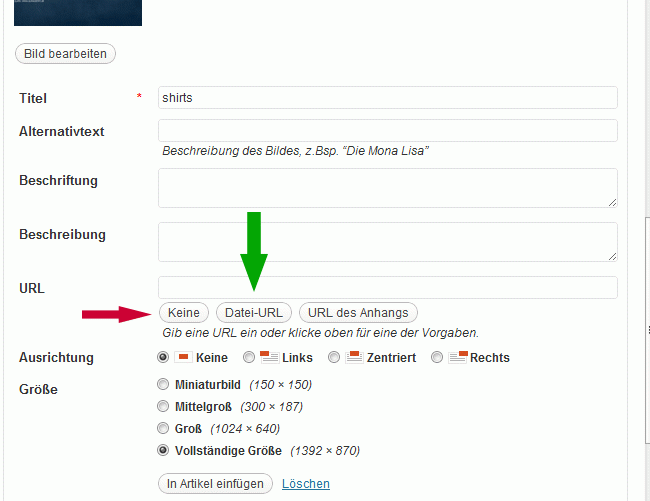
No I figured it out. It’s kind of dumb. If I uploaded an image with the gallery uploader of your theme, the URL field in the image options remained empty and if I pressed “insert into post” it would be in the post, but it wouldn’t show up since the URL was hidden.
You have to set it to file-URL.
Here’s an image of what I mean (in german though but it should be obvious enough):
http://f.666kb.com/i/c74bi82zn7y3tsg5g.gifIf the URL field is set to “file-URL” it will be shown in your gallery upload template in the portfolio item and also one the public page.
It’s actually the same if you set it to “none” with a new slider image, but somehow the slider images are always set to “file-URL” automatically, at least in my wordpress installation.
I don’t know if this is a common “bug”, maybe it was just some wrong setting. Maybe it would be a good idea to mention this with a small screenshot in your next documentation update under “Create A Portfolio Item”… just in case other people have the same problem :)
Regards,
MariusOh okay I didn’t see that, the menu works now thanks!!! The reason why the footer looked weird was that the widgets were displaced (widget from footer 1 was in footer 2, widget from footer 4 was in the portfolio sidebar).
So v3.1 works fine now beside the portfolio gallery… I tried it several times with different images exactly the way you described in the documentation. Any ideas?
I already downloaded the latest version today, it also doesn’t work with 3.1 :/
and the custom nav menu section just explains how to create a custom menu… I already explained that I have a custom menu and that it works fine with v2.3 but not with 3.1
upload for gallery doesn’t work. they disappear right after uploading. i can upload other images though, slider images etc.