
-
Posted in : BookCard WP
-
Hello. Like many, my contact form is not working. I just purchased the theme a few days ago, and it is Version 4.4, however there are no available updates showing when logged into WordPress. How do I update this theme? Thanks.
Hi, current version is 4.5, and contact form is working on our side. Please update and try again.
Hello. If you read my message you’d see the question was HOW TO UPDATE?
Usually when logged into WordPress, a theme indicates that there is an update, which you can perform from there. But Bookcard is showing no updates available (although it is Version 4.4 like I already said). I downloaded Bookcard from Themeforest when I purchased the theme only a few days ago. Are you telling me to re-download the theme from Themeforest and reinstall the theme all together? I’m just not sure HOW TO DO THE UPDATE. Thanks.
Hi again. I figured it out after finding the update instructions AFTER re-downloading the theme from Themeforest. This is an unusual way to update a theme, so it would have been helpful if you’d supplied update instructions elsewhere so that customers don’t have to sign up for forum, await reply, etc. Or if you’d read my first message and answered instead of copying and pasting from another post. Just a thought. Thanks for the great-looking theme, though.
I’m having the same problem – I had to unpublish my contact page.
My version in 3.2 though – where is this version 4.x???
Hey Sinclair,
TO update you have to actually re-download the theme from where you purchased it (Themeforest) and then install it as a new theme. You will see Bookcard there twice in your WordPress admin (Themes) and you just need to activate the newest version. Hope it helps. Support is not so great for this theme – my contact form still doesn’t work even with the update, and no one is getting back to me. Good luck!
My contact form, after updating to the 4.5 theme, is not working. I really need this up and running….
(mrbake.co.uk)
@kt_user: Thanks for your helpful messages.
– The new update notifications for themes in the WordPress admin are only for the free themes by providing WordPress.org theme directory.
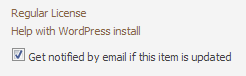
– If you want to receive a new version message for the ThemeForest themes, then check the notification option. You will find it in your download menu on ThemeForest.
See in the image:
– Just tested again the theme on my host. The contact form working fine. I think this a server related issue. So, please contact your server people and let us know what we must do exactly. Maybe your servers allow only SMTP connections for sending mails. If so, this the problem. Because this theme sends mail via the PHP mail() function.
Note: I will try to add a SMTP option.
Note 2: At this time you can use the Contact Form 7 plugin for a temporarily solution. (Use that plugin with any of SMTP plugin if needed. You can get your smtp info from your host)
Thanks for your patience.
Hi Mehmet
I spoke to my host. They said when using the PHP mail() function there can be a very large message queue, for this we suggest setting up your script to use SMTP mail, that way it will send instantly instead of being placed into a queue.
How can we change the script to the SMTP mail?
@mrbake: Please see this post http://www.pixelwars.org/forums/topic/version-4-5-contact-form-not-working/#post-9948


You must be logged in and have valid license to reply to this topic.