

Forum Replies Created
list of topics you have created till now.
-
-
You can use qTranslate plugin.
Please read the documentation.
Impossible.
Open search from theme options.
Use portfolio template.
Items per page limit for all departments.
Download: sample-data.zip
Some other people reported this. I will ask it to a professional.
Add your code to the end of your file.
What is your IE version?
Mehmet S.
Keymaster18 August 2013 at 17:00Posted in : Sorting portfolio items -> navigation problemWhy do you want to change the default order?
Do you have a chance to test it on iPad 3?
Did you upload the theme via wp admin?
Yes you are right. I will try to fix this. Thanks for the feedback.
I see now your all portfolio items are in 1x size.
Contact form is working on a php server. Comment form does not functional. Because this is a static html template, not a wordpress theme. WordPress version will be available in two weeks.
Remove that class.
Only for ICA?
Don’t forget to check contact form shortcode in the documentation.
Which plugin did you use to import the file?
What do you mean with portfolio icons?
Please read the documentation.
Go to dummy data folder in the package.
Please read the dummy data section in the documentation.
Please download the package from ThemeForest. You can find it in the package.
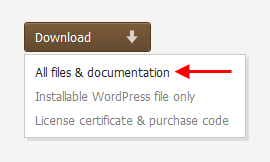
Please read its documentation.
You can use inline video shortcode.
That search box does not functional in the html version. It runs on wordpress version.
Which search box?
Please search a plugin for that on the repository then go back here.
Why do you want to make limitation for tags?
Keymaster14 August 2013 at 23:04Posted in : Sorting portfolio items -> navigation problem@jorditarrida: Which code exactly?
Keymaster14 August 2013 at 23:01Posted in : Sorting portfolio items -> navigation problem#filters li.pf-all-items { display: none; }Can you provide a screenshot?
Which is your host?
Ok.
What kind of video?
.cover h3 span { color: #BCD7FC; }.accordion-group .accordion-heading .accordion-toggle { background-color: #19CFF7; }Which color do you want to set for the yellow titles?
Theme Options > Custom CSS
What are actual dimensions of your image?
Keymaster14 August 2013 at 14:07Posted in : Show Only Post Titles on Tag and Category PagesThanks for the sharing.
Did you read the localization section in the documentation?
You mean the first 20 tags.
– open index.html in a code editor.
– find contact form.
– add php codes:
<form id="contact-form" method="post" action="send-mail.php">
	<input type="hidden" id="to" name="to" value="yourname@yourdomain.com">

	<p>
		<label for="name">Name</label>
		<input type="text" id="name" name="name" class="required">
	</p>

	<p>
		<label for="email">Email</label>
		<input type="text" id="email" name="email" class="required email">
	</p>

	<p>
		<label for="subject">Subject</label>
		<input type="text" id="subject" name="subject" class="required">
	</p>

	<p>
		<label for="message">Message</label>
		<textarea id="message" name="message" class="required"></textarea>
	</p>

	<?php
		$random1 = rand(1, 5);
		$random2 = rand(1, 5);
		$sum_random = $random1 + $random2;

		echo '<p>';
			echo '<label class="title" for="sum_user">' . $random1 . ' + ' . $random2 . ' = ?</label>';
			echo '<input type="text" id="sum_user" name="sum_user" class="required" placeholder="What is the sum?">';
			echo '<input type="hidden" id="sum_random" name="sum_random" value="' . $sum_random . '">';
		echo '</p>';
	?>

	<p>
		<img class="ajax-loader" alt="Sending ..." src="images/bckg/loader_light.gif">
		<input type="submit" class="btn submit" value="SEND">
	</p>
</form>
– save as index.php
– download: bookcard-send-mail-php-with-captcha.zip
Keymaster13 August 2013 at 22:52Posted in : Sorting portfolio items -> navigation problem.pf-all-items { display: none; }