

Forum Replies Created
list of topics you have created till now.
-
-
Mehmet S.
Keymaster15 November 2012 at 16:06Posted in : Child theme css not overriding responsy cssYou can use the “important” keyword:
i.e.
#logo { padding: 100px !important; }
Keymaster13 November 2012 at 23:03Posted in : Child theme css not overriding responsy cssDid you make the right way like on this page?
http://codex.wordpress.org/Child_ThemesI will get back to you asap.
Copy the code below to the box of Theme Settings > Style > Custom CSS
.footer a { color: red; }Good luck.
Explain more please.
There are options, please see:
Theme Settings > Style > Back To The Portfolio Link
Theme Settings > Style > See Project Details Text
Please download the latest version at http://themeforest.net/item/responsy-wp-responsive-html5-portfolio/2290361
Please see in images:
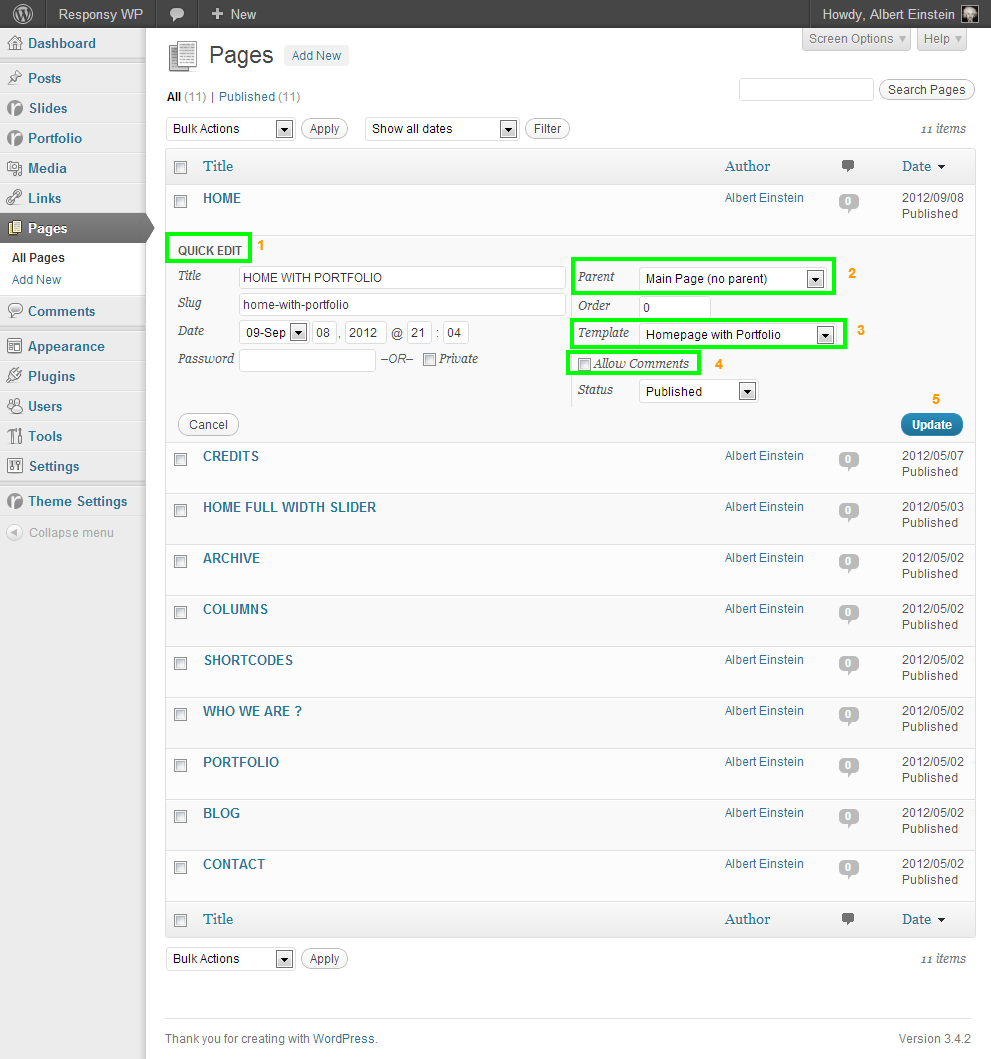
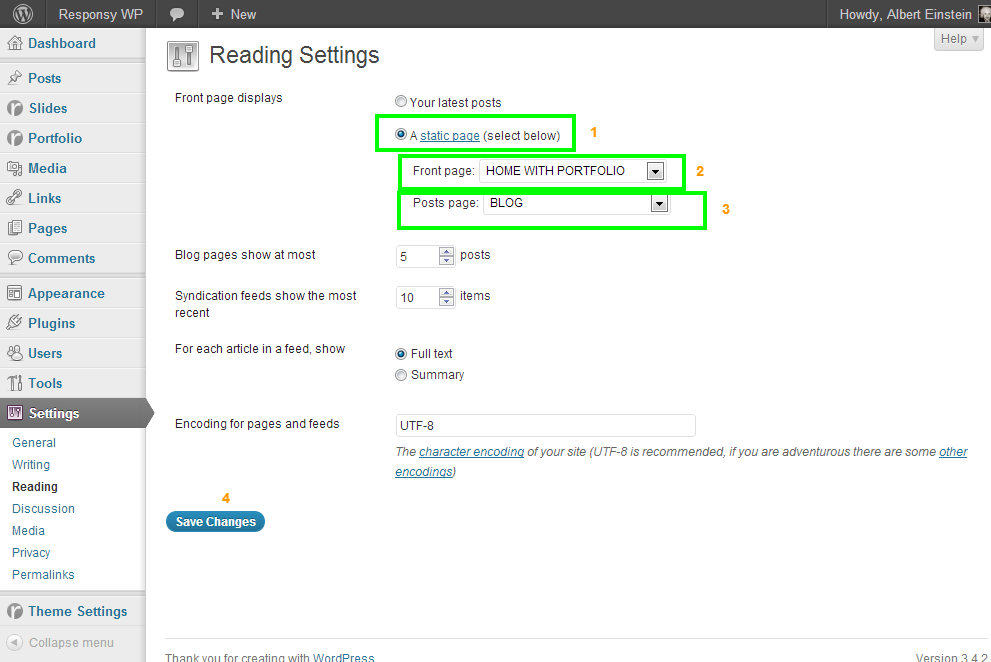
Please see: Documentation > Widgets.
Your theme version?
Please see:
How To Learn A Theme Version?
http://www.pixelwars.org/forums/topic/how-to-learn-a-theme-versionThere is an option to disable it.
Theme Settings > Style > Disable Go To Top Link
Yes, just change the widget order.
Please see:
How To Create Homepage?
http://www.pixelwars.org/forums/topic/how-to-create-homepageSet 770 value on that option to make it square.
– There is an option to make the map square Theme Settings > Conact > Google Map Height
– There is a widget area for conact page sidebar (Contact Page Sidebar), you can use text widget to display map on the sidebar.
Please see:
How To Create Multiple Portfolios?
http://www.pixelwars.org/forums/topic/how-to-create-multiple-portfolios
Keymaster30 October 2012 at 14:22Posted in : Portfolio departments displaying a 404 errorIt is weird. Try to change the Permalink Settings to Default.
( Settings > Permalink Settings )
Keymaster30 October 2012 at 13:53Posted in : Portfolio departments displaying a 404 errorPlease see:
How To Create Multiple Portfolios?
http://www.pixelwars.org/forums/topic/how-to-create-multiple-portfolios
Please see:
How To Create Blog Homepage?
http://www.pixelwars.org/forums/topic/how-to-create-blog-homepage
You should work with a developer.
We will improve the theme.
Please see:
How To Create Homepage?
http://www.pixelwars.org/forums/topic/how-to-create-homepage
—
– firstly thanks for the feedback, we will improve the theme,
– but to solve your first issue at this time,
— Navigate to Appearance > Editor > contact.php,
— find “Enter keyword…” and change it.Please see:
How To Create Multiple Portfolios?
http://www.pixelwars.org/forums/topic/how-to-create-multiple-portfolios
Sorry, they are impossible.
#logo img { max-height: 100px; }The code in the link above for the wordpress, but for the html version differences between old and new codes;
Old:
http://twitter.com/javascripts/blogger.js
New:http://api.twitter.com/javascripts/blogger.jsOld:
http://twitter.com/statuses/user_time...
New:http://api.twitter.com/1/statuses/user_timeli...Theme Settings > Style > Custom CSS;
#logo { padding-top: 0px; padding-bottom: 0px; }We will get back to you asap.
See: How To Make Longer Your Custom Logo If It Has Long Width? http://www.pixelwars.org/forums/topic/faq
– Settings > Reading > Front page displays > Your latest posts, (selected)
– Theme Settings > Blog > Enable Slider On Blog Page, (checked)
– Slides > Add New Slide > Slide Image Attributes > Enable For Blog Page Slider, (chechked for every slide).
Maybe your browser cached your site, refresh the site.
Keymaster22 October 2012 at 20:17Posted in : is there a way to show more than 6 clients ?It is hard to do.
See: Documentation > Localization.
Theme Settings > Blog;
Media > Add New
Theme Settings > Style > Custom CSS;
#nav li.active, #nav > li:hover, #nav ul li { background-color: #444; background-image: -webkit-gradient(linear, left top, left bottom, from(#444), to(#999)); background-image: -webkit-linear-gradient(top, #444, #999); background-image: -moz-linear-gradient(top, #444, #999); background-image: -o-linear-gradient(top, #444, #999); background-image: linear-gradient(to bottom, #444, #999); }See: Documentation > Localization.
Do you have any seo plugin in active?
In homepage, it is your created homepage. Navigate to Pages > All Pages, and change the ttile of your homepage.
Hi, don’t worry the updates are for wordpress version.
How To Update Responsy WP: http://www.pixelwars.org/forums/topic/updating-responsy-wordpress-theme
Theme Settings > Style > Custom CSS;
.services img { width: 128px; height: 128px; }It is impossible at this time, but we will improve the theme.
Drag Editor Content widget to homepage widget area and use services shortcode in your created homepage’s editor content.
Portfolio item’s featured image is for portfolio page thumbnail viewing. In gallery type portfolio item has ten field for its slider.
It is weird, try another way,
– Navigate to Media > Add New,
– Add your logo to library and copy the image path,
– Finally paste the path to Logo box and save.
Keymaster12 October 2012 at 23:11Posted in : Links from Home Page's Services Images and TextYou can use
image_url=""[services_wrap title="" sub_title=""] [service image_src="image-path-here" image_url="page-name-here" alt="" service_title=""]<a href="page-name-here">link</a>[/service] [/services_wrap]


