Forum Replies Created
list of topics you have created till now.
-
-
– Check the comment by rdrgmrqz at this page:
http://themeforest.net/item/impressivcard-wp-responsive-html5-vcard/discussion/3347567– There is no single page viewing in this design.
It is complicated.
Help Documentation > Menu.
impressivCard WP v1.2 Is Available
http://www.pixelwars.org/forums/topic/impressivcard-wp-v1-2-is-availablePlease see:
http://www.pixelwars.org/forums/topic/blank-pages-followed-documentationThis is not possible by default, needs more further customization, you may consider working with a professional, if you are not familiar to WordPress coding.
Please see: Help Documentation > Widgets.
Actually the theme is ready for localization. We have made every string translate able with the text domain “responsy”, use Codestyling Localization plugin or Poedit editor.
Please see: Help Documentation > Localization.
Do you have v3.4?
Download:
http://themeforest.net/item/responsy-wp-responsive-html5-portfolio/2290361How To Learn A Theme Version?
http://www.pixelwars.org/forums/topic/how-to-learn-a-theme-version– I have tested toggles in a post, they worked also there.
– Now the accordion test is ok. But do not forget to add close tag for it.
[accordion] [accordion_pane accordion_title="dog"]cat.[/accordion_pane] [accordion_pane accordion_title="rat"]Amouse.[/accordion_pane] [/accordion]Try new version:
http://themeforest.net/item/impressivcard-wp-responsive-html5-vcard/3347567There is a plugin for pricing table.
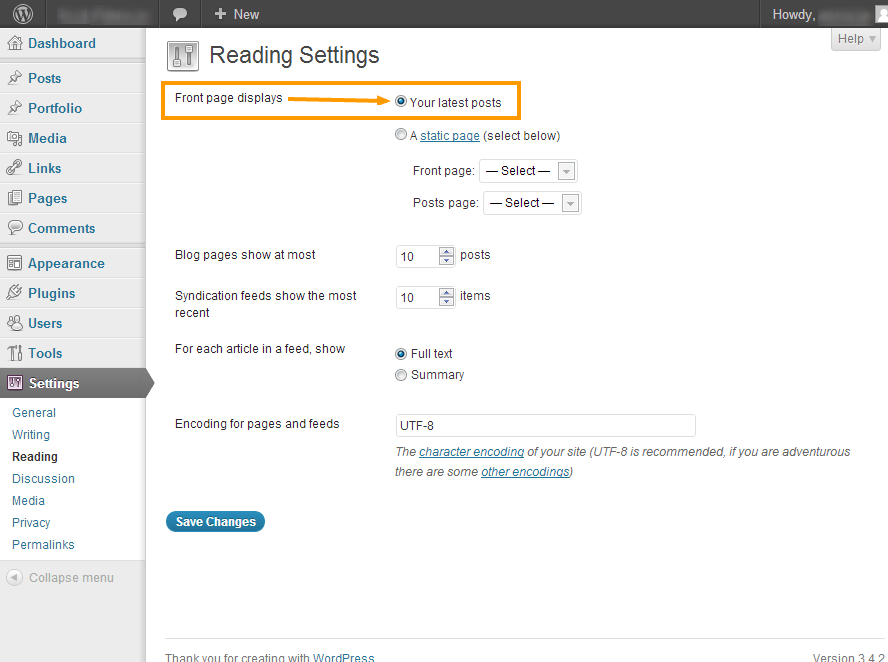
Your latest posts option should be selected. Please see the image below:
[inline_slider arrows="true"]
	[slide caption="" url="" src=""]
	[slide caption="" url="" src=""]
	[slide caption="" url="" src=""]
[/inline_slider]
caption: slide title
url: link
src: image sourceTested and the result is normal.
Result images:
http://themes.pixelwars.org/responsy-wp/wp-content/uploads/2012/11/toggle-test-1.png
http://themes.pixelwars.org/responsy-wp/wp-content/uploads/2012/11/toggle-test-2.png
http://themes.pixelwars.org/responsy-wp/wp-content/uploads/2012/11/toggle-test-3.png
http://themes.pixelwars.org/responsy-wp/wp-content/uploads/2012/11/toggle-test-4.png
Try this:
.caption span { display: none !important; }Thanks.
Correct way for menu linking:
sameye.fr/#/contactWrong:
sameye.fr/contactNote: Doc updated, please download new version at:
http://themeforest.net/item/impressivcard-wp-responsive-html5-vcard/3347567Please download the latest version and try its php file.
http://themeforest.net/item/responsy-responsive-html5-portfolio/2126658
Do you know your server allow to send mail for PHP?
You can ask this to your hosting company.
Copy and paste the code below to the box of Theme Options > Style > Custom CSS
.caption span { display: none; }If your wordpress installation is under your domain as sub folder
– sitename.com/wordpress
Then you want to make it
– sitename.com
Navigate to WordPress Admin > Settings > General > Site Address (URL)
Please see: Help Documentation > Menu
This is not possible by default, needs more further customization, you may consider working with a professional, if you are not familiar to WordPress coding.
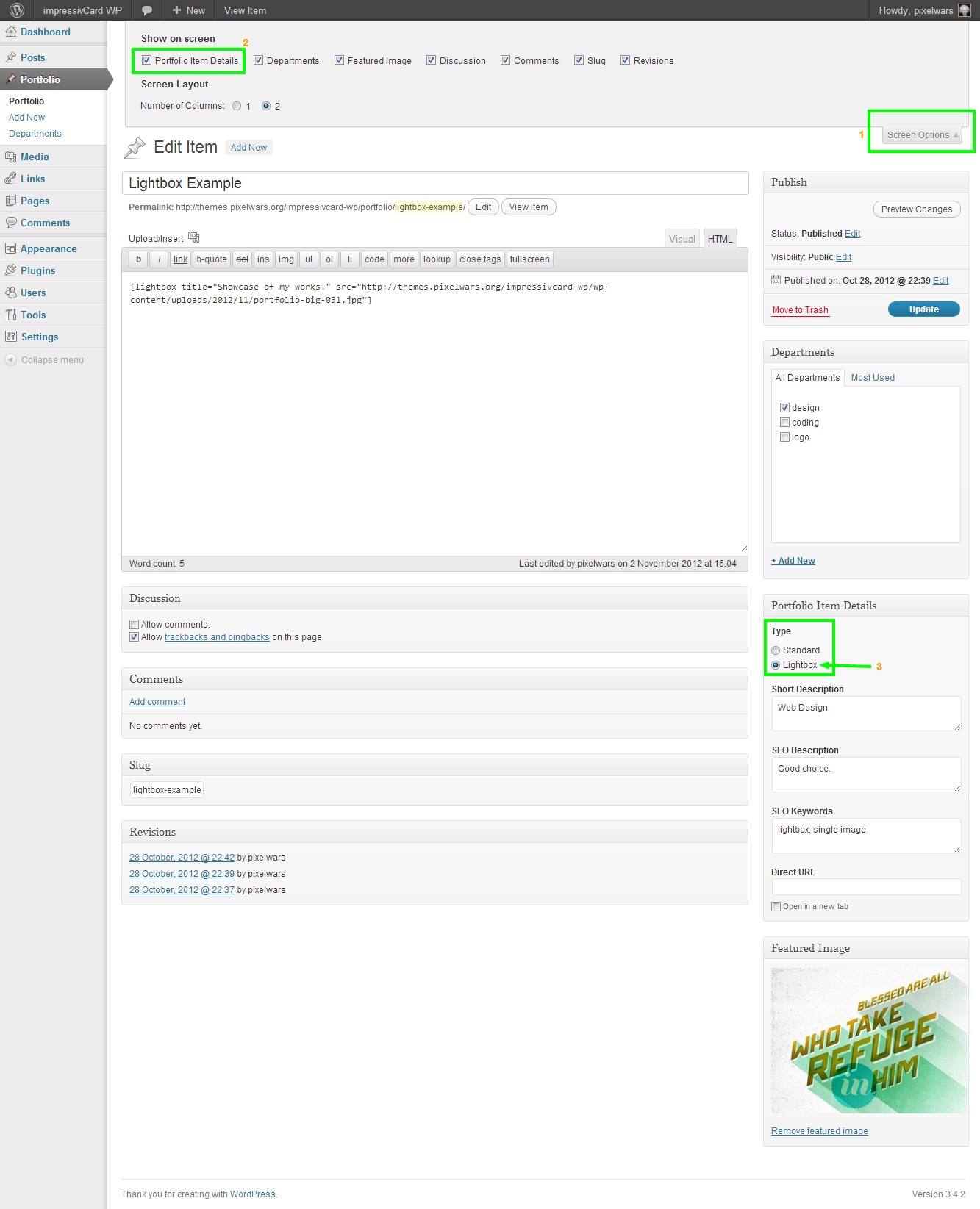
Please see the image below to how to set it up:
Mehmet S.
Keymaster21 November 2012 at 00:12Posted in : Adding "Name, Age, Birthplace" on About PageThe process explained in the help documentation and the dummy data file located under Dummy Data folder in the download package.
About all of the theme files.
Please see:
– Help Documentation > Menu
– Help Documentation > Widgets
Keymaster20 November 2012 at 13:38Posted in : Adding "Name, Age, Birthplace" on About PageDid you try to upload the dummy data?
Please see: Help Documentation > Dummy Data
You don’t have to update other themes when you are using responsy wp.
There is no way at this time.
Keymaster19 November 2012 at 23:57Posted in : Version 3.4 Menu Items Showing Up As A ListWe are planning to update the documentation.
Thanks, good luck.
Please see: Documentation > Widgets
Keymaster19 November 2012 at 17:36Posted in : Gallery in portfolio doesn't work – responsy 3.4See:
 Keymaster19 November 2012 at 16:43Posted in : Gallery in portfolio doesn't work – responsy 3.4
It has worked on my pc.
Good luck :)
Please see:
How To Modify A WordPress Theme?
http://www.pixelwars.org/forums/topic/how-to-modify-a-wordpress-themePlease see:
Recommended Plugin: Shareaholic | email, bookmark, share buttons
http://www.pixelwars.org/forums/topic/recommended-plugin-shareaholic-email-bookmark-share-buttonsPlease see:
Download and unzip then replace:
http://themes.pixelwars.org/responsy-wp/wp-content/uploads/2012/11/portfolio-single-file.zipKeymaster18 November 2012 at 13:41Posted in : Version 3.4 Menu Items Showing Up As A ListPlease see:
How To Style Navigation Menu?
http://www.pixelwars.org/forums/topic/how-to-style-navigation-menuPlease see: Documentation > Localization.
Theme Settings > Style > External Stylesheet/JavaScript
<script> $(function() { $( '.post .more-link' ).addClass( 'btn btn-success' ); }); </script>Keymaster17 November 2012 at 03:33Posted in : Spacing problem in Chrome // No animation in IE91 – Please provide a live preview link,
2 – IE9 is not support CSS3 animations.
I will help you if you provide an online link.
We have not tested the theme with the BuddyPress plugin. What kind of problem do you have with this plugin?
There is a fix:
– Open main.js file with a code editor,
– find the lines below at the end of the file:
$( 'footer .go-to-top' ).click( function()
{
	$( 'body' ).animate( { scrollTop: 0 }, 1000 );

	return false;
});
– Add a new line right this:
$( 'footer .go-to-top' ).click( function() { $( 'body' ).animate( { scrollTop: 0 }, 1000 ); $( 'html' ).animate( { scrollTop: 0 }, 1000 ); return false; });Please see:
How To Create Homepage?
http://www.pixelwars.org/forums/topic/how-to-create-homepage– The given url above is a search url:
http://www.gamedesignfu.com/?s=#/portfolio
– This is normal:
http://www.gamedesignfu.com/#/portfolio
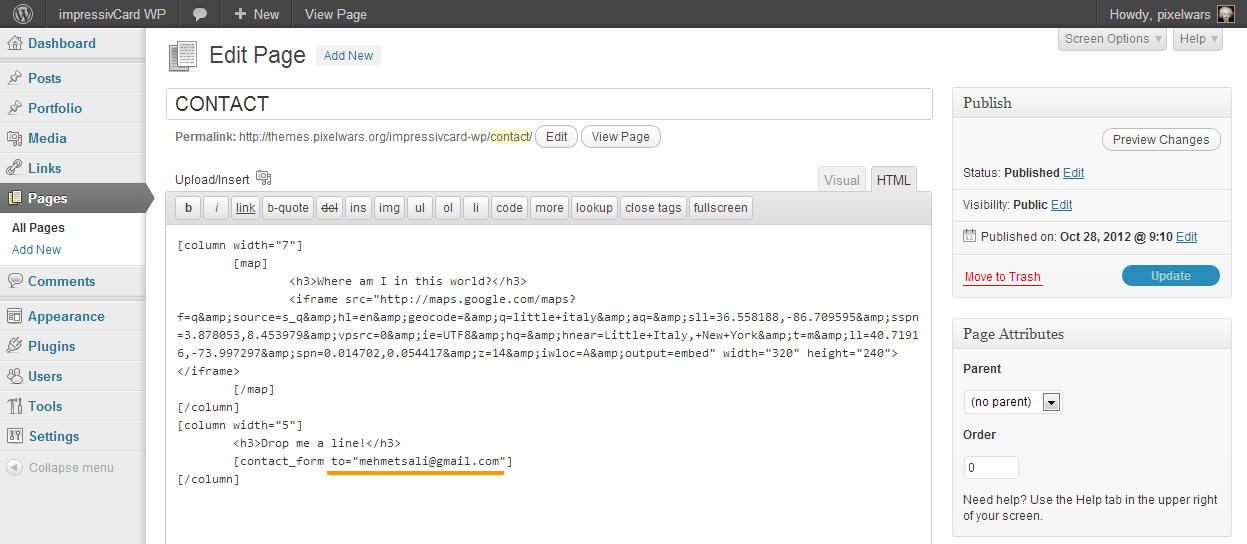
– You can try “Featured Image” section to upload an image one of your portfolio item. Please see the images below: