

Forum Replies Created
list of topics you have created till now.
-
-
To add captcha:
[contact_form captcha="yes" to="me@you.it" subject="This message from my personal site"]Max viewable image size is 1170px width in this theme. So over from this size is unnecessary.
It is impossible.
That’s a nice idea. I will have that in mind for a next update. Thanks.
You can edit the pop-up alert “The sum is incorrect” manually from send-mail.js file. It is located under js folder of the theme.
Mehmet S.
Keymaster18 December 2012 at 00:48Posted in : old comments closed after WP "Elvin" update?Please see:
http://www.pixelwars.org/forums/topic/responsy-wp-v3-5-is-availableKeymaster14 December 2012 at 17:37Posted in : old comments closed after WP "Elvin" update?Check the option below:
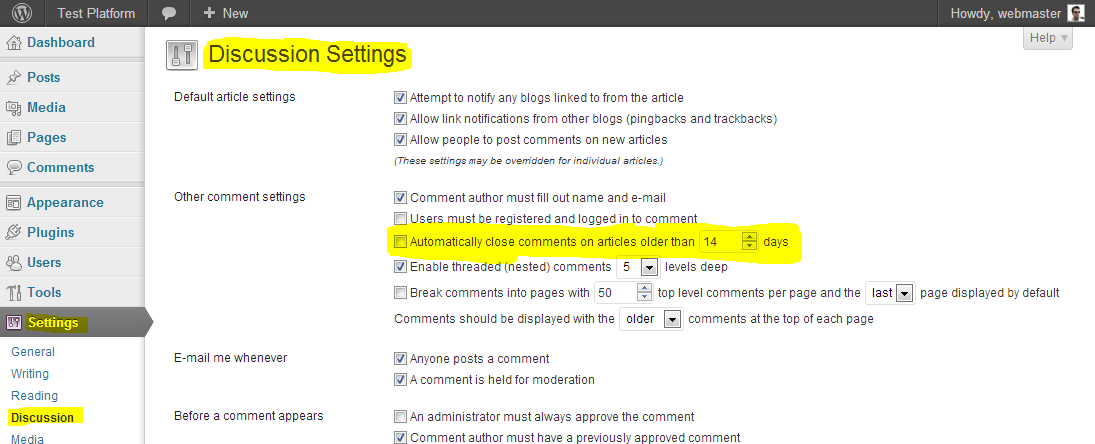
We are working to add captcha functionality to the contact form.
Not yet, but I will have that in mind for a next update.
Also see this post:
http://www.pixelwars.org/forums/topic/coordinates-for-creating-custom-pagesIt is about your server configuration. You can ask this to your hosting company.
Hi, update the code;
<script> $(function() { $('#filters li').first().remove(); setTimeout(function() { $('#filters li').first().find('a').trigger('click')}, 1000); }); </script>Yes, there is a way, all in one seo pack supports custom post types ( portfolio ), see the image below:

Responsy WP is not compatible with that plugin.
WordPress SEO by Yoast
http://www.pixelwars.org/forums/topic/recommended-plugin-wordpress-seo-by-yoastThere is no single page viewing in this design. You must use widgets.
Please see: Help Documentation > Widgets
Please see:
How To Create Homepage?
http://www.pixelwars.org/forums/topic/how-to-create-homepageYou can use
image_url=""[services_wrap title="" sub_title=""] [service image_src="" image_url="" alt="" service_title=""]Text 1[/service] [service image_src="" alt="" service_title=""]Text 2[/service] [service image_src="" alt="" service_title=""]Text 3[/service] [service image_src="" alt="" service_title=""]Text 4[/service] [/services_wrap]Keymaster30 November 2012 at 19:00Posted in : arrows don't navigate between portfolio entries– WordPress Settings > Permalink Settings: “Post name” option should be selected to work the menu properly.
– Your menu linking is not correct 100%
Your linking:
sitename.cc/#about-meOur linking:
sitename.cc/#/about-mePlease see: Help Documentation > Menu
It is weird, try to delete old site.
Please see:
http://codex.wordpress.org/Giving_WordPress_Its_Own_Directory– Check the comment by rdrgmrqz at this page:
http://themeforest.net/item/impressivcard-wp-responsive-html5-vcard/discussion/3347567– There is no single page viewing in this design.
It is complicated.
Help Documentation > Menu.
impressivCard WP v1.2 Is Available
http://www.pixelwars.org/forums/topic/impressivcard-wp-v1-2-is-availablePlease see:
http://www.pixelwars.org/forums/topic/blank-pages-followed-documentationThis is not possible by default, needs more further customization, you may consider working with a professional, if you are not familiar to WordPress coding.
Please see: Help Documentation > Widgets.
Actually the theme is ready for localization. We have made every string translate able with the text domain “responsy”, use Codestyling Localization plugin or Poedit editor.
Please see: Help Documentation > Localization.
Do you have v3.4?
Download:
http://themeforest.net/item/responsy-wp-responsive-html5-portfolio/2290361How To Learn A Theme Version?
http://www.pixelwars.org/forums/topic/how-to-learn-a-theme-version– I have tested toggles in a post, they worked also there.
– Now the accordion test is ok. But do not forget to add close tag for it.
[accordion] [accordion_pane accordion_title="dog"]cat.[/accordion_pane] [accordion_pane accordion_title="rat"]Amouse.[/accordion_pane] [/accordion]Try new version:
http://themeforest.net/item/impressivcard-wp-responsive-html5-vcard/3347567There is a plugin for pricing table.
Your latest posts option should be selected. Please see the image below:
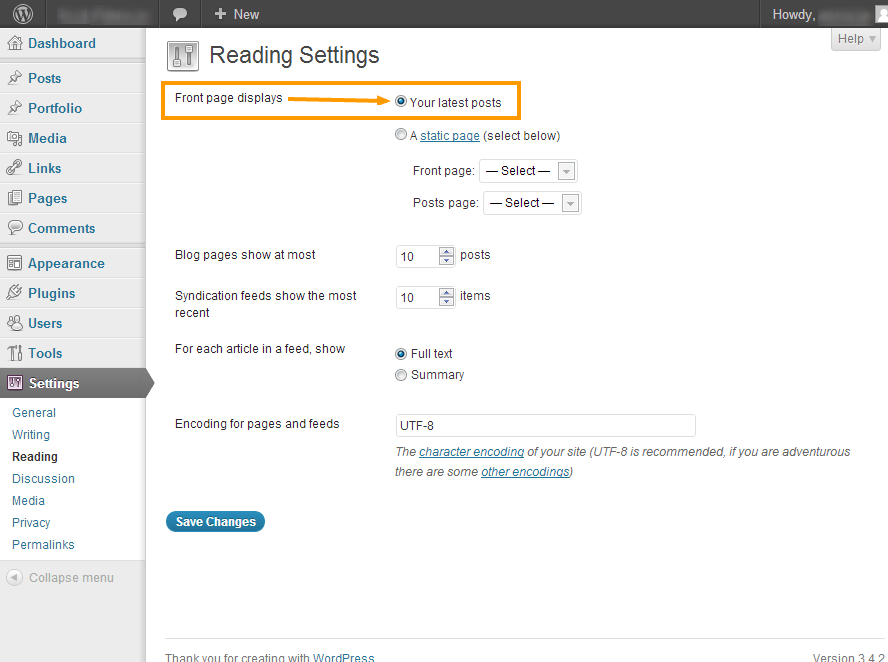
[inline_slider arrows="true"]
	[slide caption="" url="" src=""]
	[slide caption="" url="" src=""]
	[slide caption="" url="" src=""]
[/inline_slider]
caption: slide title
url: link
src: image sourceTested and the result is normal.
Result images:
http://themes.pixelwars.org/responsy-wp/wp-content/uploads/2012/11/toggle-test-1.png
http://themes.pixelwars.org/responsy-wp/wp-content/uploads/2012/11/toggle-test-2.png
http://themes.pixelwars.org/responsy-wp/wp-content/uploads/2012/11/toggle-test-3.png
http://themes.pixelwars.org/responsy-wp/wp-content/uploads/2012/11/toggle-test-4.png
Try this:
.caption span { display: none !important; }Thanks.
Correct way for menu linking:
sameye.fr/#/contactWrong:
sameye.fr/contactNote: Doc updated, please download new version at:
http://themeforest.net/item/impressivcard-wp-responsive-html5-vcard/3347567Please download the latest version and try its php file.
http://themeforest.net/item/responsy-responsive-html5-portfolio/2126658
Do you know your server allow to send mail for PHP?
You can ask this to your hosting company.
Copy and paste the code below to the box of Theme Options > Style > Custom CSS
.caption span { display: none; }If your wordpress installation is under your domain as sub folder
– sitename.com/wordpress
Then you want to make it
– sitename.com
Navigate to WordPress Admin > Settings > General > Site Address (URL)
Please see: Help Documentation > Menu
This is not possible by default, needs more further customization, you may consider working with a professional, if you are not familiar to WordPress coding.
Please see the image below to how to set it up:
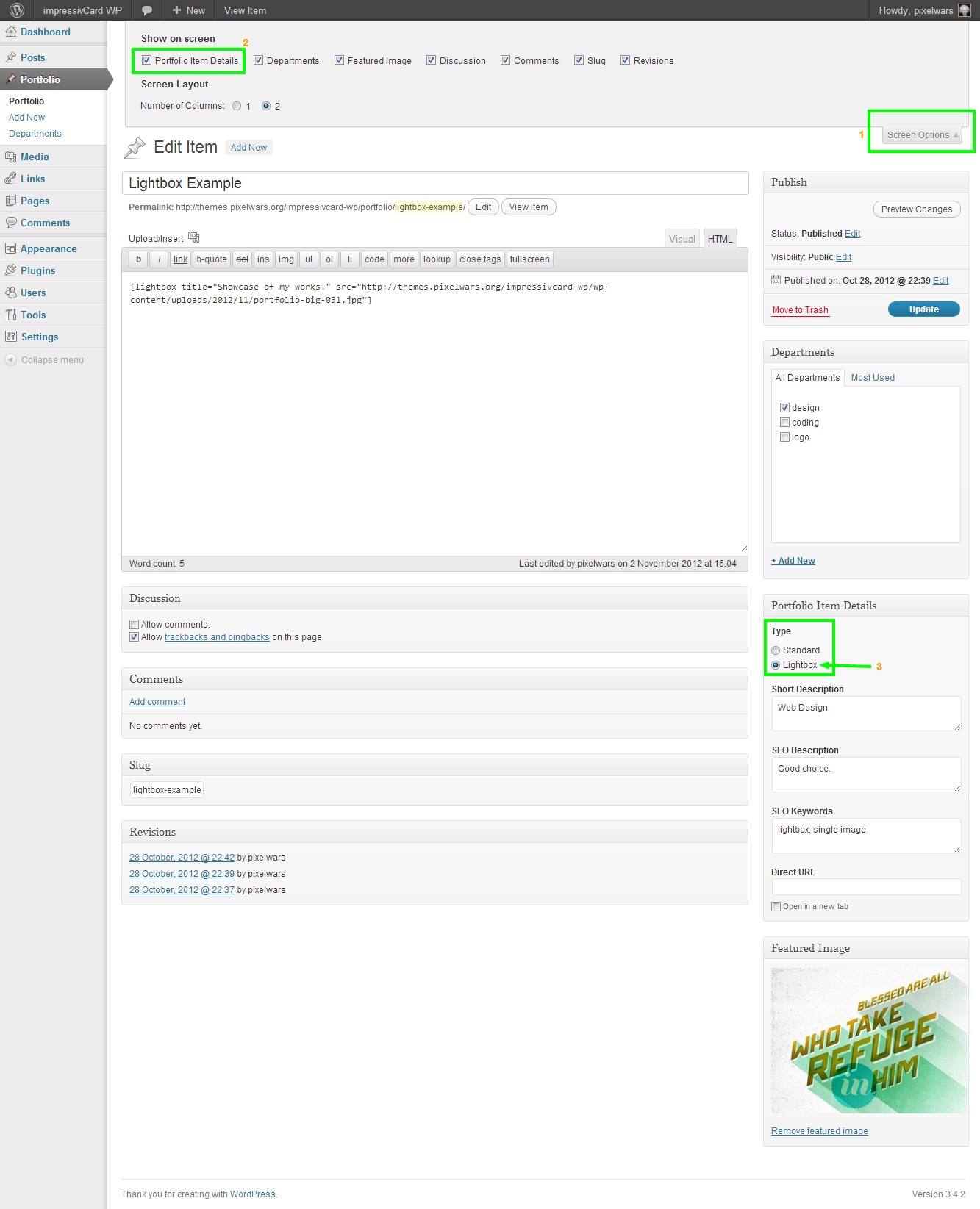 Keymaster21 November 2012 at 00:12Posted in : Adding "Name, Age, Birthplace" on About Page
The process explained in the help documentation and the dummy data file located under Dummy Data folder in the download package.
About all of the theme files.
Please see:
– Help Documentation > Menu
– Help Documentation > Widgets
Keymaster20 November 2012 at 13:38Posted in : Adding "Name, Age, Birthplace" on About PageDid you try to upload the dummy data?
Please see: Help Documentation > Dummy Data
You don’t have to update other themes when you are using responsy wp.
There is no way at this time.