

Forum Replies Created
list of topics you have created till now.
-
-
New version is available. Please update.
Every post/page has a “Quick Edit” link when you hover in the editing list. Click it to open “QUICK EDIT” menu then uncheck the “Allow Comments” option.
– Please create new topics for your every different questions.
Please read the theme documentation carefully.
New version is available. Please update.
Please check the Theme Settings page.
Which slider?
New version is available. Please update.
Tested, working.
New version is available. Please update.
New version is available. Please update.
New version is available. Please update.
New version is available. Please update.
Paste to Theme Options > Style > Custom CSS:
.entry-title { display: none; }Can you provide a screenshot?
Put your image file url to
image_src=""parameter.I’m now working to make it compatible.
Please update to the new version.
Not compatible with WordPress 3.5.2
Not compatible with WordPress 3.5.2
Go to Theme Options > Style > Customize > Fonts > Page Title Font.
They are shortcodes.
Please read the documentation.
Please read the documentation.
Soon.
I want to finish it in a month.
Paste to Theme Options > Style > Custom CSS:
.page-template-page-home-php .site-header { padding-bottom: 0px; } .page-template-page-home-php .post-list { padding-top: 0px; } .page-template-page-home-php .readable-content article { padding: 0px; }a:hover { /* Text color */ color: black; /* Bg color */ background-color: white; }Not compatible with WordPress 3.5.2
Not compatible with WordPress 3.5.2
I haven’t tested with the WPML plugin. Did you test it?
There is a sidebar for post single view. ( Theme Options > Blog > Post Sidebar ).
– I will add sidebar to blog page.
Thanks SynGamer.
Thanks b3tzi.
Thanks SynGamer.
Paste to Theme Options > Style > Custom CSS:
.portfolio-nav a.button:hover { background: green; }Add more items.
– Go to Admin > Portfolio > Departments,
– Delete which you wants.
Add text:
– Paste to Theme Options > Style > External JS:
<script>
jQuery(document).ready(function($)
{
$('#header ul li:nth-child(2) a').html('Resume');
$('#header ul li:nth-child(3) a').html('Portfolio');
$('#header ul li:nth-child(4) a').html('Contact');
});
</script>
Hide icons:
– Paste to Theme Options > Style > Custom CSS:
#header ul li:nth-child(2) a:before { content: ""; } #header ul li:nth-child(3) a:before { content: ""; } #header ul li:nth-child(4) a:before { content: ""; }Please read the Localization section in the documentation.
– Use Add More tag from content editor,
– Use youtube embed url.
Diese Seite wurde von Heinrich Ruppel erstellt. <a href="http://impressum.com">Impressum</a>
Can you provide a url?
You have only one blog type at a time from Theme Options > Blog > Blog Type.
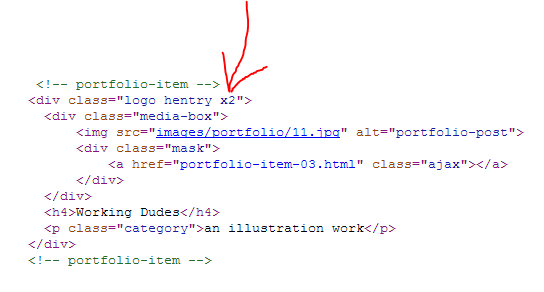
Paste to Theme Options > Style > Custom CSS:
#header { position: fixed; }Can you provide a screenshot?
I don’t have Nexus 7, sorry.
h1.site-title a { border-bottom: 0px; }
h1.site-title { margin-bottom: 0px; }
.site-header hgroup { padding-bottom: 0px; }
.site-header { padding-bottom: 0px; }
