

Forum Replies Created
list of topics you have created till now.
-
-
Hi, We will add this feature for the page title with the next update. If you provide me your related url for archive page, I can give you custom css code.
You should add ( max-width 768px ) for the mobile devices.
ThanksHi Arthur,
Could you send me your wp admin details via our contact form and add this topic url as well.
http://www.pixelwars.org/contact/
ThanksHi,
Please go to appearance > customize > meta > single post meta > share (hidden)
ThanksHi melaniejoos,
Arthur dealing with the same issue and first of all, I can recommend you to deactivate all your plugin (except theblogger shortcode plugin) and try it again. Most of the problems occur because of this. Of course, if the theme has any problem, we will fix this immediately but we need to be sure that, is it related to theme or another plugins.
ThanksHi, Actually, it is centered but title takes 8 column and close part takes 4 column.
You can use text align left for now. If I find a solution then I will let you know.
ThanksHi, Please go to ;
Appearance > theme options > style > enable your mobile zoom.
ThanksHi Arthur,
First of all, could you deactivate your plugins (except theblogger shortcode plugin) and try it again.
Third party plugin can mess the themes sometimes.
Please keep me updated.
ThanksHi, When you use the search feature, the themes erasing the hashtag and using different function and default background is white that is why the bar is not looking well. I can recommend you to use this custom css code;
.page-layout { background-color: #d2efef; }Thanks
Hi,
I just saw that you created a support topic in the plugin support section. I believe that plugin’s author will give you a solution soon.
ThanksHi,
You can get information in the theme page.
– fixed: z-index issue for home sections with bg image
ThanksHi,Please go to appearance > widgets > empathy template page and drag and drop custom menu for your page.
Just be sure that it should be same order as your menu.
ThanksHi,
Please try to use this plugin.
https://wordpress.org/plugins/taxonomy-terms-order/
ThanksYou’re welcome.
Hi,
You can check out this text.
$sender_domain = ‘server@eberhardt1.com’;
The template uses PHP mail() function.
The php mail() function must be enabled in your server.
ThanksYou’re welcome, please don’t forget to rate the theme on themeforest if you liked it, thanks.
You are welcome.
Hi,
You can use this custom css code;.blog-creative:not(.first-full) .post-thumbnail { background-color: #fff; }Thanks
Hi, could you add this line to the code which I gave you.
float: none;.drop-cap:first-letter, .single-post .entry-content > p:first-child:first-letter { font-size: 14px; line-height: 1.9; font-weight: normal; padding: 0; margin-bottom: 0; float: none; }Also, hard reload the browser again. Same times they can hold the old cashes and you can delete them.
ThanksYou said that the code is not working well, so give me that page’s URL then I will check the code. Because it should work properly.
ThanksHi, It is different theme. Could you provide me the related url for post thumbnails, please ?
ThanksHi, Could you provide me the related url, please ?
ThanksYou’re welcome, please don’t forget to rate the theme on themeforest if you liked it, thanks.
Hi, Your first custom css code should have two curly brackets end of the code. Because it has media query for specific width.
}}
That is why it is effecting other codes as well.
ThanksHi, Just replied this issue;
http://www.pixelwars.org/forums/topic/delete-post-publication-date
ThanksHi, Of course, it should work. Before this custom css code, probably you forgot the close your last custom css code;
#page{ background-color: #fafafa }
You have this custom css code and I didn’t see the curly brackets end of the code.
ThanksHi,
You can use this custom css code;.drop-cap:first-letter, .single-post .entry-content > p:first-child:first-letter { font-size: 14px; line-height: 1.9; font-weight: normal; padding: 0; margin-bottom: 0; }Thanks
Hi,
You can use this custom css code;.entry-date, .tptn_date { display: none; }Thanks
Hi,
You can install and run this plugin;
https://wordpress.org/plugins/dynamic-to-top/
ThanksHi, you can check out this related url.
http://www.pixelwars.org/forums/topic/how-to-use-custom-css-for-wordpress-themes/
ThanksHi nikhilkhare,
When you upload the demo data, please go to: Settings > Reading. Select “Home” page as a front page, and select “blog” page as a posts page.
Please go to appearance > widgets > empathy template page and drag and drop the widget for blog.Hi, Please go to appearance > customize > site identity > upload your header background image here.
ThanksHi, If you don’t see the Excerpt meta box when editing the page, then you need to enable it. Click on the Screen Options button on the top right corner of the screen. A fly down menu will appear, and you need to simply check the box next to Excerpt.
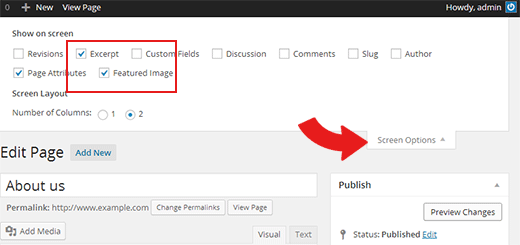
Now scroll down to the excerpt meta box which is below the post editor.
ThanksHi Jeremi,
Hi can remove the custom css code and try to uplaod the featured image, after that add the custom codes one by one. One of your custom css code could affect the main blog.
You can use this custom css code for your second issue,.page .entry-content > h1 { margin-top: 0; }Thanks
Hi Agata,
You can use these custom css code;@media screen and (min-width: 768px) { .blog-list .hentry-middle { padding: 0 3em; }.blog-list.first-full .hentry:first-child .hentry-middle { max-width: 740px; padding: 2em 0; }Thanks
Hi,
Remove that custom css code and try to use it..header { background-position: 55% 45%; }Thanks
You can find it in the documentation as well. Well when you import the dummy data it is also coming up.
[row]
[column width_md="6"]
[map latitude=”29.720157″ longitude=”-95.4013379″ zoom=”4″ image=”http://themes.pixelwars.org/ucard/wp-content/uploads/2016/11/marker1.png”%5D
[/column]
[column width_md="6"]
<h4>Drop Me A Line</h4>
[contact_form to="info@johndoe.com" subject="Contact form message from uCard"]
[/column]You’re welcome, please don’t forget to rate the theme on themeforest if you liked it, thanks.
Hi dashneimark,
Mobile refresh rates it different behind the web browsers. There are too many factors as much device specifics. It is not a default feature for the theme. It may not be supported for the all mobile devices.
ThanksHi, sorry it is not available by default and it requires more time and effort to customization, if you are not familiar to coding you may consider hiring an expert at envato studio.
Hi, Please go to pages > home > and be sure that you added the map shortcode here.
ThanksHi, I see what you mean. It is totally different from our demo. In your video, there is a video lightbox inside the standard lightbox. It should be because of the localhost.
You can add a standard portfolio item and just add the video link. It will look on the standard player.
If you choose lightbox video option for the portfolio item, it will look like on our demo website.
Thanksserkan
Moderator18 November 2016 at 23:22Posted in : Posted in/Leave a comment beneath post excerptHi Jeremi,
You should see that line. Other visitors shouldn’t be able to see those words.
ThanksHi romanvisuals,
Could you send me the related url, please ?
I will check what causes the problem.
ThanksHi, Please go to pages > edit the page (example about-me page) and go to excerpt area. It is located at the bottom of the page and change it.
ThanksYou’re welcome, please don’t forget to rate the theme on themeforest if you liked it, thanks.
Hi,
Edit your portfolio and on the right-hand side, you can see the publish box. Go to visibility settings and choose password protected.
ThanksHi, It doesn’t matter. It should work regardless of your server. Just you can contact them to enable the mail function or just use the ninja form plugin. Style should be the same.
ThanksHi,
[section_title icon=”icon-brush” text=”DESIGN SKILLS”]
[progress_bar first_bar=”yes” last_bar=”” text=”FIREWORKS” percent=”90″]
[progress_bar first_bar=”” last_bar=”” text=”PHOTOSHOP” percent=”60″]
[progress_bar first_bar=”” last_bar=”yes” text=”ILLUSTRATOR” percent=”40″]
Your shortcode doesn’t look okay. Before and after don’t close the column or row shortcode.
Thanks
Hi dashneimark,
You can install and run loco translate plugin. Search that text and re-write it. You can read the localization section in the documentation.
ThanksHi Jin,
The Blogger and Photographer have different code layout. We are improving our themes regularly. If any customer reports us a bug, we are fixing it immediately. Showing/hiding the submenu items are not a bug. It is just a style. We are not planning to change the style for now but I will report this to our developers and will keep that in our minds.
Thanks for the feedback.
