

Forum Replies Created
list of topics you have created till now.
-
-
Please read the theme’s documentation.
Hey,
1- I will fix that and release an update in a week. Thanks for the feedback.
2- Weird.
3- I will think about it.
Lightbox video with button:
– Switch the Text tab of the content editor and use the following html code:
<div class="launch"><a class="btn lightbox iframe" data-lightbox-gallery="fancybox-item-00" href="put-your-video-url-here">Download Resume</a></div>
– Example:
<div class="launch"><a class="btn lightbox iframe" data-lightbox-gallery="fancybox-item-00" href="http://player.vimeo.com/video/37254322?badge=0&color=ffffff">Download Resume</a></div>
I have just added that font and the new version will available tomorrow.
Try this:
style="padding-top: 0;"Thanks for the feedback.
Twitter updated its API to v1.1. Twitter API v1.0 is retired and no longer functional. I’m now working on this.
You can use the following css code to hide the white block: (paste it to the end of main.css file)
.cover .widget-twitter { display: none; }I don’t understand.
What is the original size?
I see your concern about seo, but this theme is a one page design. All pages are in the front page.
Paste to Theme Options > Style > Custom CSS:
h1.site-title a { border-bottom: 0px; }
.site-header hgroup { padding-bottom: 0px; }
Featured image? You mean hiding it in the post detail page?
Please use localization method.
– Go to Documentation > Localization.
Paste to Theme Options > Style > Custom CSS.
– Title font-size: (change 62px)
.cover h1
{
font-size: 62px !important;
color: black;
text-shadow: none;
}
– Slogan font-size: (change 16px)
.cover h2 { font-size: 16px !important; color: black; text-shadow: none; }Try this:
style="margin-top: 0;"Paste Theme Options > Style > Custom CSS:
.comment-content p { font-size: 1.1em; }Because your front cover image, back cover image and stamp images are too big.
The images in the demo site:
– Front Cover Image: (770×1090)px
– Back Cover Image: (842×1191)px
I have added an option for that.
– Go to Theme Options > Pages > Portfolio Page Title.
Please select the “Post name” option from Permalink Settings.
Paste Theme Options > Style > Custom CSS:
#home .cover { background-size: contain; }I will think about it.
I will research that.
– Can you provide a screenshot from iPhone?
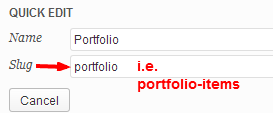
– Change the slug of your Portfolio department. “portfolio” word is a function keyword for the theme.
Paste to Theme Options > Style > Custom CSS:
body { font-style: italic; }To change its font-size:
Paste to Theme Options > Style > Custom CSS:
a.rm-button-open strong.ribbon-content { font-size: 25px !important; }Twitter updated its API to v1.1. Twitter API v1.0 is retired and no longer functional. I’m now working on this.
New version is available with that feature.
Please check your widget location.
Note: Sorry, I didn’t see this topic.
Paste to Theme Options > Style > Custom CSS:
.readable-content { margin-left: 0px; }
#main .row { margin-left: 25px; }
header.site-header .row { margin-left: 0px; }
header.site-header hgroup
{
text-align: left;
margin-left: 25px;
}
.main-navigation { text-align: left; }
Note: Sorry, I didn’t see this topic.
Which heading?
I’m now improving blog/post functionality.
Sorry, I don’t know.
It is working on my side.
Paste to Theme Options > Style > Custom CSS:
.blog .wp-flattr-button { display: none; } .single .wp-flattr-button { text-align: center; }You can add images by using content editor.
Sorry, I don’t know.
For homepage?
Which galleries?
I checked your site. Your bookcard is very good. Good luck :)
Blog page improved. Please update to the latest version.
Tested. It is working on my side. Please check Plugin Forums.
That’s a nice idea. I will add an option to change its font with one of 600+ Google Fonts. Thanks for the feedback.
– Please see this topic for ribbon: http://www.pixelwars.org/forums/topic/ribbon-style
– I will do a test for lightbox.
Try only this:
.btn { -webkit-border-radius: 0px; border-radius: 0px; background-image: none; }There is no access to your url.
Please read the Localization section in the theme documentation.
Paste to Theme Options > Style > Custom CSS:
h1.site-title a { font-weight: bold; }That’s a nice idea. I will have that in mind for a next update. Thanks.
Very interesting. What kind of error log messages are reporting?
Please check Isotope documentation.
Paste to Theme Settings > Style > Custom CSS:
.btn { -webkit-border-radius: 0px; border-radius: 0px; background-clip: padding-box; background-image: none; background-color: green; }Not tested. You can try.
