

Forum Replies Created
list of topics you have created till now.
-
-
I have not tested the theme with that plugin. But Read WP theme has coded in high standard. That plugin is not a free one. So you can try a free solution before buy it.
There is a free popular multilingual plugin in WordPress plugin directory. It is qTranslate.
Paste to Theme Options > Style > Custom CSS:
.site-header { padding-bottom: 0px; }Paste to Theme Options > Style > Custom CSS:
.site-description { color: green; }Did you try amazon name as above ones?
Which dotted lines exactly?
Do not use full URL in your custom menu.
You can use default page template.
I do not understand.
Can you provide a screenshot?
Thanks.
Enter some content to your portfolio items.
Is that code worked?
There is a theme documentation in the downloaded package.
I will fix this on next update.
All right then, you can use it.
Do not use full url in the custom menu.
Paste to Theme Options > Style > Custom CSS:
.back-to-portfolio { display: none; }Where did you see the Amazon icon?
Try this:
.flexslider { text-align: center !important; }404 Not Found.
Re-install the theme.
– Add the parameter:
function button( $atts, $content = null )
{
	extract( shortcode_atts( array( 'button_text' => 'Button', 'new_tab' => "",
									'bold_text' => '',
									'button_type' => 'btn-default',
									'button_size' => '',
									'button_link' => '#' ), $atts ) );

	if ( $bold_text == "yes" )
	{
		$button_text_out =  "<b>$button_text</b>";
	}
	else
	{
		$button_text_out =  "$button_text";
	}

	$button =  '<a ' . $new_tab. ' class="btn ' . $button_type . ' ' . $button_size . '" href="' . $button_link . '">' . $button_text_out . '</a>';

	return $button;
}

add_shortcode('button', 'button');
Button shortcode:
[button new_tab="target='_blank'" button_text="My button" button_link="http://www.example.com"]Not supported.
Go to Appearance > Editor > functions.php
– find the line:
$hero_button_out = '<p><a href="' . $hero_button_link . '" class="btn ' . $hero_button_type . ' btn-large"><b>' . $hero_button_title . '</b></a></p>';
– add
target="_blank"$hero_button_out = '<p><a target="_blank" href="' . $hero_button_link . '" class="btn ' . $hero_button_type . ' btn-large"><b>' . $hero_button_title . '</b></a></p>';– I see the functions.php,
– add the new parameter in usage:
[button target="_blank" button_text="My button" button_link="http://www.example.com"]Save the changes after editing.
Download “Main Files” from ThemeForest. It contains the documentation.
Paste to Theme Options > Style > Custom CSS:
.cover h1 { font-size: 35px !important; }Tested, it is working.
[lightbox video="yes" title="Lizard Men" src="http://www.youtube.com/v/YGZD_v_Cths?hl=en_US&version=3"]
Do not worry, they are not error. That css validator does not support the 3D css rules.
Foursquare is not available for now.
Use Text Widget in Contact Page Sidebar.
Did you test the portfolio page on all browsers.
– Open book.ccs file under css folder,
– Find the opening codes:
.rm-container.rm-open .rm-cover {
	-webkit-transform: rotateY(-180deg);
	-webkit-transition-delay: 0s;
	-moz-transform: rotateY(-180deg);
	-moz-transition-delay: 0s;
	-o-transform: rotateY(-180deg);
	-o-transition-delay: 0s;
	-ms-transform: rotateY(-180deg);
	-ms-transition-delay: 0s;
	transform: rotateY(-180deg);
	transition-delay: 0s;
}

.rm-container.rm-open .rm-right {
	-webkit-transform: rotateY(180deg);
	-webkit-transition-delay: 0.2s;
	-moz-transform: rotateY(180deg);
	-moz-transition-delay: 0.2s;
	-o-transform: rotateY(180deg);
	-o-transition-delay: 0.2s;
	-ms-transform: rotateY(180deg);
	-ms-transition-delay: 0.2s;
	transform: rotateY(180deg);
	transition-delay: 0.2s;
}
– Change the delay values.
Switch to “Text” tab of content editor of your homepage and remove pre tags.
– Remove these:
<pre> and </pre>
Paste to Theme Settings > Style > Custom CSS:
.flexslider { text-align: center; }Add
targetparameter to [button] shortcode:– Go to Appearance > Editor > functions.php,
– Find [button] shortcode code lines:
function button( $atts, $content = null )
{
	extract( shortcode_atts( array( 'button_text' => 'Button',
									'bold_text' => '',
									'button_type' => 'btn-default',
									'button_size' => '',
									'button_link' => '#' ), $atts ) );

	if ( $bold_text == "yes" )
	{
		$button_text_out =  "<b>$button_text</b>";
	}
	else
	{
		$button_text_out =  "$button_text";
	}

	$button =  '<a class="btn ' . $button_type . ' ' . $button_size . '" href="' . $button_link . '">' . $button_text_out . '</a>';

	return $button;
}

add_shortcode('button', 'button');
– Add the parameter:
function button( $atts, $content = null )
{
	extract( shortcode_atts( array( 'button_text' => 'Button', 'target' => "",
									'bold_text' => '',
									'button_type' => 'btn-default',
									'button_size' => '',
									'button_link' => '#' ), $atts ) );

	if ( $bold_text == "yes" )
	{
		$button_text_out =  "<b>$button_text</b>";
	}
	else
	{
		$button_text_out =  "$button_text";
	}

	$button =  '<a ' . $target . ' class="btn ' . $button_type . ' ' . $button_size . '" href="' . $button_link . '">' . $button_text_out . '</a>';

	return $button;
}

add_shortcode('button', 'button');
Button shortcode:
[button target="_blank" button_text="My button" button_link="http://www.example.com"]
Re-install the theme.
Use embed url.
Good luck :)
This is not a problem. IE browser does not support 3D technology.
It is weird. Can you test the demo site on your side?
This is not possible by default, needs more further customization, you may consider working with a professional, if you are not familiar to WordPress coding.
Before the end date of the api.
You can use alternative method:
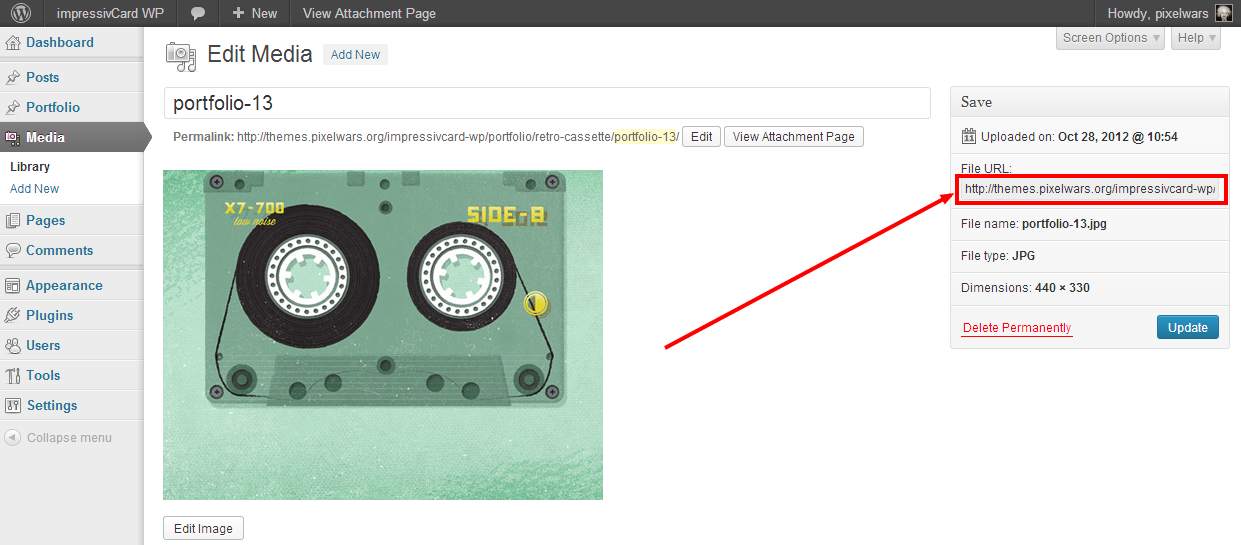
– Upload your image to the Media Library, copy image File URL ( not browser address bar ) and paste it to url field in the theme options page.

The demo site is good on my side. (Windows 7)
Paste to Theme Options > Style > Custom CSS:
.site-header { padding-bottom: 0px; }– Go to Appearance > Editor > header.php,
– Find this:
data-safeMod="false"
– Set its value to
truedata-safeMod="true"
For close button:
– Paste to Theme Options > Style > Custom CSS:
.rm-close { border-bottom: 1px dashed #888; }
.rm-close:after,
.rm-close:before
{
border-top: 4px solid #333;
margin-top: 1px;
width: 25px;
}
For open button:
– Paste to Theme Options > Style > Custom CSS:
.ribbon:before { border-left-color: #D64B4B; }
