

Forum Replies Created
list of topics you have created till now.
-
-
Hi, please check out the localization section in the theme documentation.
Thanks
Can you provide your url?
Hi, deactivate your plugins and try again.
Thanks
Ok. Good luck.
Ok. Good luck.
Ok. Good luck.
Hi, select aside format and use its shortcode.
Thanks
Ok. Good luck.
Hi, the database and FTP are separate parts of a website. Your theme and wordpress files are stayed in your ftp but all the content and theme options saved to database. So, when you update the theme, the theme files can be changed in your ftp. It is simple.
In two words: Download the latest version from ThemeForest. Upload the ZIP file of the theme via wp admin in th eregular way but not activate, because you are using a child theme. Then, go to Appearance > Editor > style.css (this is the child theme file) and change the template value to the new version file name of the theme.
Thanks
You are welcome.
Hi, select the option Theme Options > Blog > Excerpt > Only for standard format.
Thanks
You are welcome.
You are welcome.
Hi, sorry, there is no category functionality for the gallery.
New version is available on ThemeForest.
– Set to Yes the option Theme Options > Style > Font Styles.
Hi,
1) They are shortcode, not blog posts.
2) Create a new page and select blog template for it.
Thanks
Hi, try this:
[social_icons]
[social_icon type="facebook" url="http://www.facebook.com/username"]
[/social_icons]
OR
<a href="http://www.facebook.com/username"><i class="icon-facebook icon-2x"></i></a>
Note: This theme has Font Awesome 3 series icons.
icons: http://fontawesome.io/3.2.1/icons
examples: http://fontawesome.io/3.2.1/examples
Hide dotted underline under logo:
h1.site-title a { border-bottom: 0px; }Hide menu borders:
.main-navigation { border-width: 0px; }Tagline font is related to the heading font option.
– You can use this in your theme options > custom css field to hide the tagline:
.site-description { display: none; }Hi,
Use
[aside_content]shortcode.Example:
[aside_content]
Put your content here.
[/aside_content]
Thanks
Can you provide your url?
Ok. Good luck.
Hi, I will release an update for that in a week. Thanks for the feedback.
Hi,
– go to Appearance > Editor > page-archive-2.php
– find:
$args = array( 'format' => 'custom',
– edit:
$args = array( 'type' => 'yearly', 'format' => 'custom',
Thanks
Hi, yes you are right. The Continue Reading button will not appear when you fill the Excerpt field (Screen Options > Excerpt). I will improve the theme for this. Thanks for your patience.
But, at this time, you can get the Continue Reading button in two ways:
1-) with the more tag,
OR
2-) set to Yes the theme excerpt option (Theme Options > Blog > Excerpt).
This is not possible by default, needs more further customization, you may consider working with a professional, if you are not familiar to WordPress coding.
There is no save as action for the navigation menus in the wp admin.
Hi, you can change the fonts from customizer. Navigate to Appearance > Customize > Fonts.
Thanks
Sorry, I don’t know.
Please update to the latest version. You can download it from ThemeForest.
Hi, if you choose all content exportation under tools menu, your navigation menus will be included to the file.
Thanks
Hi, if you choose all content exportation under tools menu, your navigation menus will be included to the file.
Thanks
Can you provide your url?
Mehmet S.
Keymaster22 February 2014 at 02:22Posted in : Remove Site Title and tagline From All PostsHi, try this custom css:
.site-description { display: none; }Hi, you can build the site as demo easily. Create new pages as described in the theme documentation. Also, please check out the support forum.
Thanks
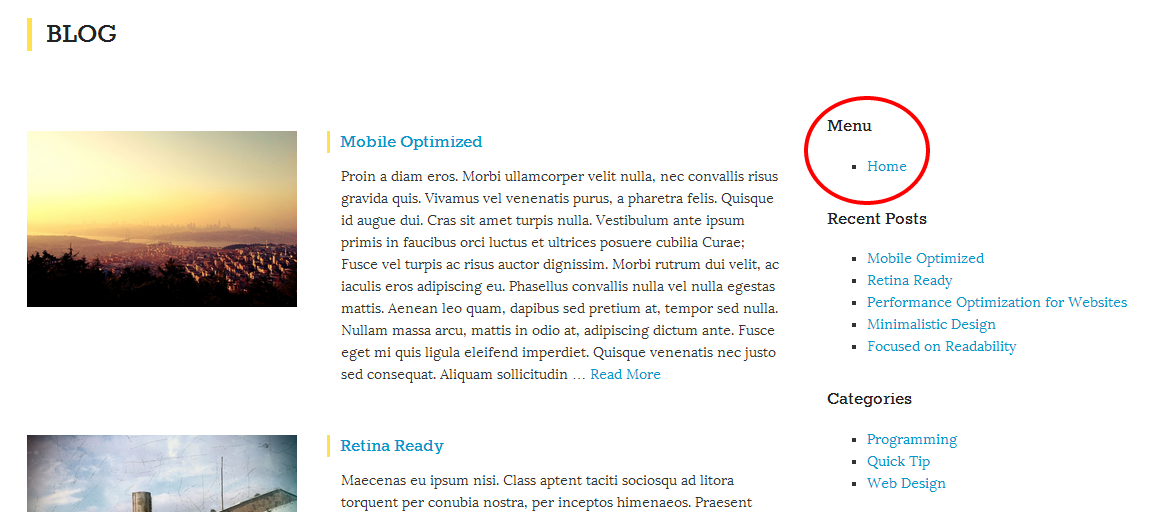
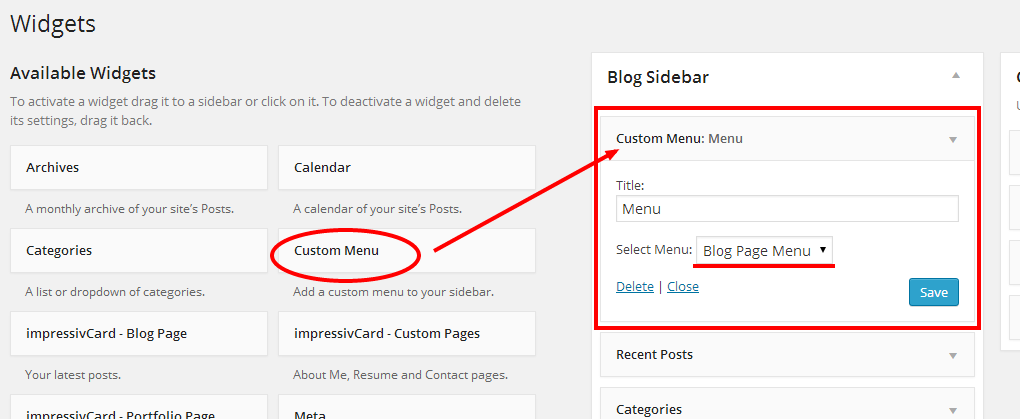
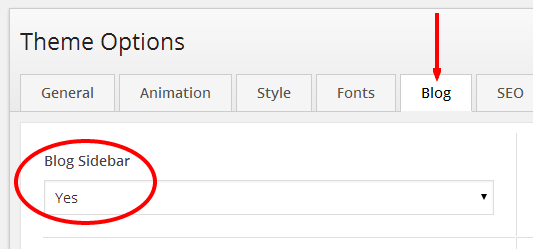
Hi, you can use the Custom Menu widget to add a navigation menu to your blog page’s sidebar.
See in the images:
Ok. Good luck.
You are welcome.
Ok. Good luck.
You are welcome.
New version is available on ThemeForest.
Thanks @aoxfordca.
Hi, please check out the Twitter Widget section in the theme documentation and Front Cover Page under Pages section.
Thanks
Can you provide a screenshot?
You are welcome.
Hi,
– standard posts have four meta info (category, date, author, comments)
– other post formats (date, comments)
Use this option to show all meta info in all posts.
Thanks
Hi, select default template for your homepage.
Thanks
There is no a built-in Instagram widget.
Hi, it is the last 30 posts for standard format. You need to edit the
page-archive-2.phpfile to show all formats.– Go to Appearance > Editor > page-archive-2.php
– Find:
if ( $format == false )
– Edit:
if ( ( $format == false ) || ( $format == true ) )
– Use this in your theme options > custom css box to hide a format:
.archives-by-format ul li:nth-child(1) { display: none; }Note: Change the number (1) to hide anyone.
Hi, check out the section Blog > Blog Types > Blog Page Template.
Thanks