

Forum Replies Created
list of topics you have created till now.
-
-
Tested that special characters and there is no problem. They appear on my gmail. I think it is about your server configuration. Contact your host. Your server people may help you.
– go to Appearance > Editor > blog-sidebar.php
– find this:
<?php
   if ( have_posts() ) :
– edit:
<?php
   query_posts( 'cat=-1,-2,-3' );
   if ( have_posts() ) :
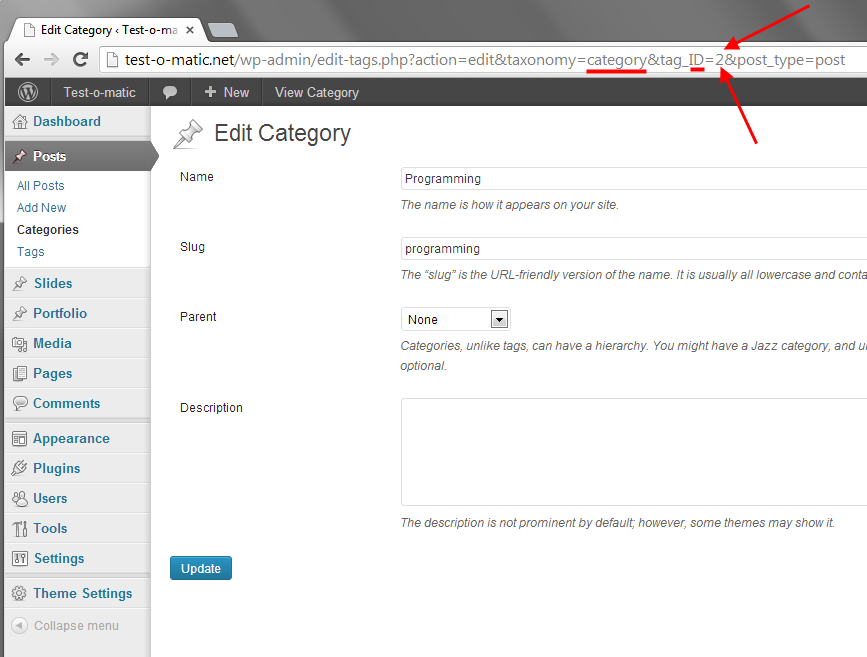
The numbers are category ids. You can find a category id in your editing screen.
See in the image:
Hi, you will get the same result if you try it with the default WordPress theme. Because the WordPress functions are not defined outside of the WordPress. So, they don’t work.
Hi,
– upload your images to your Media Library.
– click the Edit link of your image.
– you will see the File URL input in the edit screen of the image.
– copy the url.
– create a slideshow by using [inline_slider ] shortcode.
– use that url in the src parameter of the [slide] shortcode.
Example:
[inline_slider]
   [slide src="http://themes.pixelwars.org/read-wp/wp-content/uploads/2013/01/gallery-01.jpg"]Title for this slide[/slide]
   [slide src="http://themes.pixelwars.org/read-wp/wp-content/uploads/2013/01/gallery-02.jpg"]Title for this slide[/slide]
   [slide src="http://themes.pixelwars.org/read-wp/wp-content/uploads/2013/01/gallery-03.jpg"]Title for this slide[/slide]
[/inline_slider]
Thanks
Hi, go to Settings > Reading > Blog pages show at most.
Thanks
Hi, use this in your custom css field:
body.category article .featured-image, body.category article .entry-content { display: none; }Which blog layout are you using?
You are welcome.
Use this in your custom css field:
body.single footer.entry-meta { display: none; }Comment functionality improved. New version is available on ThemeForest.
Comment functionality improved. New version is available on ThemeForest.
Hi, I will fix this issue and release an update in a week. Thanks for the feedback.
Update to the latest version and try again please. You can download it from ThemeForest.
Update to the latest version. You can download it from ThemeForest.
Hi, select “Latin Extended” from theme options > style.
You are welcome.
You are welcome.
New version is available on ThemeForest!
Yes, Theme Options > General > Image Logo.
Hi, disable post sidebar from Theme Options > Blog > Post Sidebar.
Hi, use this in your External JS field:
<script> jQuery(document).ready(function($) { $( '.entry-title' ).each(function() { var postTitle = $( this ).find( 'a' ).html(); $( this ).html( postTitle ); }); }); </script>Ok. Good luck.
[lightbox_image] and [lightbox_video] shortcodes are for portfolio items.
Use [inline_lightbox_image] and [inline_lightbox_video] shortcodes in posts and pages.
Example 1: ( an image in lightbox )
[inline_lightbox_wrap type="image" thumbnail="put-your-thumbnail-image-url-here"]
	[inline_lightbox_image first_image="yes" gallery="01" url="put-your-image-url-here"]
[/inline_lightbox_wrap]
… and with your image:
[inline_lightbox_wrap type="image" thumbnail="http://www.laziem.com/wp-content/uploads/2013/11/header-logo.jpg"]
	[inline_lightbox_image first_image="yes" gallery="01" url="http://www.laziem.com/wp-content/uploads/2013/11/header-logo.jpg"]
[/inline_lightbox_wrap]
Example 2: ( a video in lightbox )
Important: Don’t use watch url for YouTube videos.
– This is a watch url: http://www.youtube.com/watch?v=KZ5_2BzgHkg
– This is an embed url: //www.youtube.com/embed/KZ5_2BzgHkg?rel=0
[inline_lightbox_wrap type="video" thumbnail="http://www.laziem.com/wp-content/uploads/2013/11/header-logo.jpg"]
	[inline_lightbox_video gallery="02" url="//www.youtube.com/embed/KZ5_2BzgHkg?rel=0"]
[/inline_lightbox_wrap]
You can activate the Masonry blog from Theme Options > Blog > Blog Type.
Sorry, I don’t know.
You are welcome.
You can search a plugin for that.
There is something wrong on your site. Please update to the latest version. Then, I will check again your site.
– You can download the latest version from ThemeForest.
– Create a page with “Portfolio” template.
– Add this page to your menu.
– Go to Gallery > Add New. Create a gallery and publish. Then copy its view url.
– Go to Portfolio > Add New. Select “Direct URL” type from Details box. Paste the gallery url to direct url input.
It is working since v4.1. You can see it: http://themes.pixelwars.org/bookcard-wp
– Do the steps in the documentation.
You are welcome.
You are welcome.
Hi, I will add more more font options in future updates. Thanks for your patience.
– To embed the Cardo font collection into your web site:
Use this in your External CSS field:
<link rel="stylesheet" type="text/css" href="http://fonts.googleapis.com/css?family=Cardo:400,400italic,700">
– Now the Cardo font comes to your site with its italic and bold styles, finally select it from Appearance > Customize > Fonts to apply to your content.
Hi, I will improve the comments functionality of Read WP theme, then release an update in a week. Thanks for your patience.
Hi, use these in your custom css field:
1 – Remove tag cloud:
body.single .post-tags { display: none; }2 – Show number of posts on the masonry blog:
.blog-masonry .entry-meta { display: block; }English please.
Try this one:
.rm-right .cover { background-image: url( "image-url-here" ) !important; }– In the icon list page, just learn the name of icons to use them in the icon=”” parameter of the shortcode.
– Put all your service shortcodes to inside of one service_group shortcode.
Double check my example above.
You are welcome.
Use this in your custom css field:
.rm-right .cover { background-image: url( "image-url-here" ); }Responsy WP is an old theme, so it does’t has the new WordPress comments functionality.
You are welcome.
Use service shortcodes.
Example:
[service_group]
	[service icon="icon-laptop" title="Web Design"]I design super cool websites. It is a long established fact that a reader will be distracted by the readable content.[/service]
	[service icon="icon-tablet" title="Mobile Development"]I can develop iOS and Android apps. It is a long established fact that a reader will be distracted by the readable content.[/service]
	[service icon="icon-globe" title="Social Media"]I am a social media expert. It is a long established fact that a reader will be distracted by the readable content.[/service]
[/service_group]
Check the option on Settings > Reading > Blog pages show at most.
There is an option to upload an image, Theme Options > General > Back Cover Image.
Just tested, it works on my side. Maybe one of your another plugins the reason for that.
Ok, create portfolio page with items, then use direct url option for the images to created galleries under gallery menu.
Your site looks good on my side.
This theme uses the 600+ Google Fonts. At this time, 51 fonts have Cyrillic and 32 fonts have Cyrillic Extended.
You can check them at http://www.google.com/fonts
– Select Cyrillic or Cyrillic Extended from the “Script” drop-down menu on the left hand side.
Hi,
Select your character set from Theme Options > Style > Character Sets.
Make sure you have the latest version.
