Forum Replies Created
list of topics you have created till now.
-
-
Hi,
Please read the documentation.
Thanks
Sorry, not tested with that plugin.
I will assign this thread to developer, he will respond to you.
It is normal:
Hi,
There is invalid code character in the plain text. Please copy this code line:
$args_portfolio = array( 'post_type' => 'portfolio', 'posts_per_page' => -1, 'orderby' => 'title', 'order' => 'ASC' );
Thanks
This is not possible by default, needs more further customization, you may consider working with a professional, if you are not familiar to WordPress coding.
Hi, please download the main files from ThemeForest.
Thanks
Hi,
I think you have bought the HTML version of Bloggy. Please make sure you have WordPress version.
WordPress version (Bloggy WP): http://themeforest.net/item/bloggy-wp-responsive-minimalist-theme/5557121
HTML version (Bloggy): http://themeforest.net/item/bloggy-responsive-minimalist-template/5263037
Thanks
You are welcome!
Hi,
You should get your SMTP info from your host. And they will give you a guide to implement it and configuration parameter to their servers.
Thanks
Hi, you can use a shortcode for that. Please see the Inline Lightbox section in the documentation.
Thanks
Mehmet S.
Keymaster16 September 2013 at 23:43Posted in : Continue Reading Button Links to Middle of PageHi, it is a WordPress feature.
Thanks
Hi,
Please unzip the package yourself and find your theme in the Theme folder.
Thanks
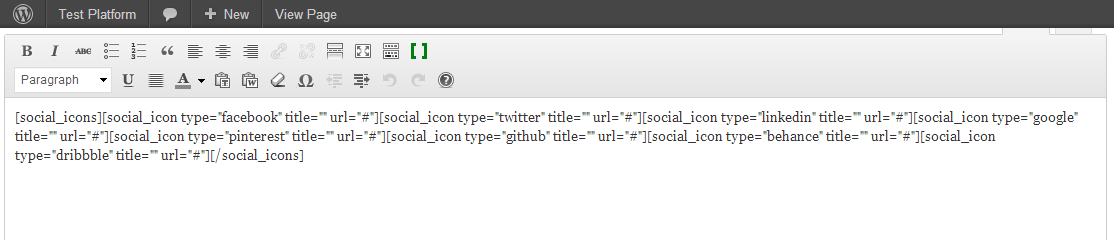
Hi, use social media shortcode in the text widget.
Thanks
Hi, use this in your custom css field:
.pptwj-tabs-wrap ul li:before { content: ""; }Thanks
( Theme Options > Style > Custom CSS )
Sorry, there is no permission for me to see that link.
Hi, you can use [cover_caption] shortcode:
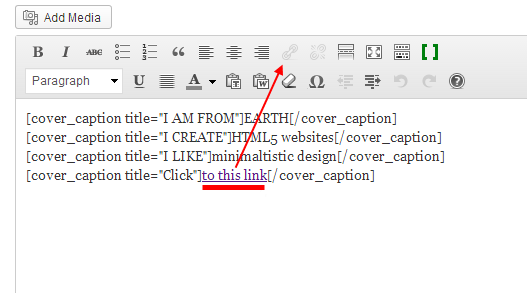
Use shortcodes in your content editor.
3 columns:
[column width="2"]
Put your content here.
[/column]
[column width="2"]
Put your content here.
[/column]
[column width="2"]
Put your content here.
[/column]
Sorry, I’m not exactly sure what you’re asking?
You can try reCAPTCHA service.
You can divide your content into two columns with the column shortcode.
[column width="4"]
Put your content here.
[/column]
[column width="4"]
Put your content here.
[/column]
Hi,
It is main.css line: 138.
Thanks
Keymaster15 September 2013 at 22:02Posted in : (urgent) How to set a link on the FrontCoverPlease jump into the right forum.
Can you please provide your tried columns?
What kind of order do you want make?
Sorry, I’m not exactly sure what you’re asking?
For which part?
Sorry for that. A minor bug detected. New version will be available on Monday. Thanks for feedback.
Hi, use this in your custom css field:
h1.site-title a { border-bottom-width: 0; }Keymaster13 September 2013 at 02:20Posted in : (urgent) How to set a link on the FrontCoverSorry, I’m not exactly sure what you’re asking?
Hi,
It works in a real server.
Thanks
Hi,
Which shortcode did you use?
Hi,
It is like this:
#header .title img { css code here }Thanks
Hi,
Use it like this:
[column width="12"]
	[row]
		[column width="4"]
			[resume_group title="xxxx"]
				[history_unit]
					content here
				[/history_unit]
			[/resume_group]
		[/column]
		[column width="4"]
			[resume_group title="xxxx"]
				[history_unit]
					content here
				[/history_unit]
			[/resume_group]
		[/column]
		[column width="4"]
			[resume_group title="xxxx"]
				[history_unit]
					content here
				[/history_unit]
			[/resume_group]
		[/column]
	[/row]
[/column]
Thanks
Hi,
It is normal for mobile devices. I mean, it is necessary to work the theme.
Thanks
Hi,
You can access them in your css files. They are in the skins folder.
Thanks
Hi,
I’m using Google Chrome and the theme is working fine on my side.
Chrome version: 29.0.1547.66 m
Hi,
the url is going to Not Found page.
Can you provide your url?
Can you provide your url?
Hi,
in which browser?
.p-single { background-color: whitesmoke !important; }You can sort them alphabetically by title with ascending or descending.
Hi,
Please see the topic http://www.pixelwars.org/forums/topic/coordinates-for-creating-custom-pages
Thanks
Hi,
Please go to Theme Settings > Blog and check the option Change Previous/Next Portfolio Item Links Location.
Thanks