

Forum Replies Created
list of topics you have created till now.
-
-
Hi,
I will improve the theme soon for multilingual plugins.
Thanks
Hi,
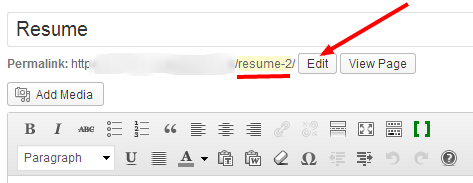
– Please go to your pages list,
– Edit your Resume and Portfolio pages,
– Only edit slugs,
– You have “resume” and “portfolio” words in your menu but “resume-2” and “portfolio-2” slugs in your pages,
– Click the Edit button to change,
See in the image:
Sorry for that, but it is necessary.
.p-single { background-color: whitesmoke; }– Open button background color:
.ribbon { background: red; }
.ribbon:before { border-color: red; }
– Open button text color:
.ribbon strong { color: black; }In which browser?
.portfolio-single { background-color: whitesmoke; }Hi,
You can localize it. Please see the Localization section in the documentation.
Thanks
Hi,
Create a page named Blog with the Template property to Default page and select it from the Post page list in the Static page option.
Thanks
Hi, it is ok now!
footer.site-footer { text-align: center; } footer.site-footer .widget-area ul { display: inline-block; } footer.site-footer .widget-area ul li { text-align: left; }Sorry, I don’t know a solution for that plugin. Subtitle is a custom property for this theme.
Hi, use this:
footer.site-footer { text-align: center; } footer.site-footer .widget-area ul li { display: inline-block; margin-left: 20px; }Yes, you are right. You also need to update font-awesome.css file. It is in the css folder.
Thanks
Hi,
What is the criteria to make one of your department importance.
Thanks
Mehmet S.
Keymaster9 September 2013 at 23:34Posted in : Number of words displayed in the post preview.Hi,
– Go to Appearance > Editor > functions.php,
– Find:
function custom_excerpt_length( $length )
{
	return 50;
}
– Change the 50 value.
Thanks
Hi, use this in your custom css field.
#portfolio .rm-inner { background-image: none; background-color: red; }Hi,
Please use embed url.
Thanks
Thank you
Yes, you are right.
Thank you
Hi,
Select the latest post option to show your news on the homepage.
Thanks
Hi,
Paste to Theme Options > Style > Custom CSS field.
Thanks
Hi,
Please update to the latest version.
Thanks
Hi,
What kind of order?
Hi, use this in the custom css field:
.template-name-homepage-with-slider .latest-posts-wrap p { display: none; }Thanks blairwarren.
Hi,
Please update to the latest version.
Thanks
Hi,
Please use column shortcodes.
Thanks
Please update to the latest version and try again.
Thanks
How did you solve it?
For portfolio: Use this in the custom css field:
.portfolio-single { max-width: 780px; }For footer: Use this in the custom css field:
footer { text-align: center; }Hi,
Set the latest post option from the reading options then go to theme options and select blog with sidebar.
Thanks
I’m planning to solve twitter in this month.
Can you provide your url?
Hi,
I will check this soon.
Thanks
Hi,
– Download that zip file,
– Unzip it,
– Open the font-awesome folder,
– Open the font folder,
– You will see 5 files,
– Copy all of them,
– Go to theme folder,
– Open css/fonts/FontAwesome/
– Replace.
Thanks
Thanks Romain.
1 – Use in the Custom CSS field:
-webkit-box-shadow: 0 0 10px #555;
-ms-box-shadow: 0 0 10px #555;
-o-box-shadow: 0 0 10px #555;
box-shadow: 0 0 10px #555;
2 – Which one?
3 – So what about the email links in the middle page?
h1 b { color: #0000FF; }What did you find in the package which you downloaded from Font Awesome?
It is weird. Please deactivate your plugins and try again.
Thanks
Please update the theme to the latest version and try again.
Thanks
Please check your slugs in your menu and the title input in the widgets. They must be same.
Thanks
Please check your homepage widgets.
Please use embed code.
You can use the column shortcode.
Download the latest version and replace.
Keymaster1 September 2013 at 01:24Posted in : How to remove loading icon from contact pageSorry, I don’t know.
h2 a { color: #0000FF; }