

Forum Replies Created
list of topics you have created till now.
-
-
Hi, it is weird. There is no problem on my side and on the ThemeForest staff. They reviewed the theme and tested. I can’t see more info to that what caused to this issue. What did your server people say?
Hi, you should use row shortcode:
[column width="12"]
	[row]
		[column width="12"]
			[row]
				[column width="7"]
					Put your content here.
				[/column]
				[column width="4" offset="1"]
					Put your content here.
				[/column]
			[/row]
		[/column]
	[/row]
	[row]
		[column width="12"]
			Put your content here.
		[/column]
	[/row]
[/column]
Thanks
All theme modification should be done by using child themes not editing the theme files directly.
Hi, please update to the latest version.
Thanks
Hi, it is like this:
[social_icon type="youtube" url="http://www.youtube.com"]
Hi, put your link to the url parameter of the shortcode:
[cv_button text="" url=""]
Sorry, I’m not exactly sure what you’re asking?
Sorry, the blog and the portfolio have different functionality.
This is not possible by default, needs more further customization, you may consider working with a professional, if you are not familiar to WordPress coding.
Hi,
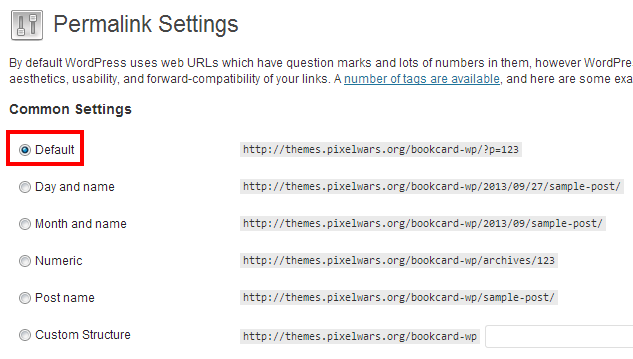
1- Select default option from permalink settings,
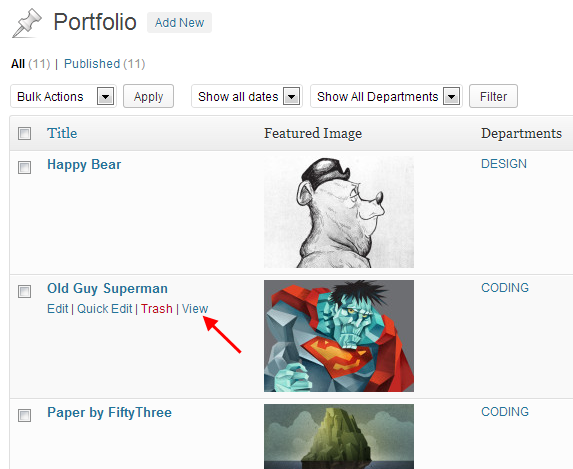
2 – Check your portfolio items by clicking the View link,
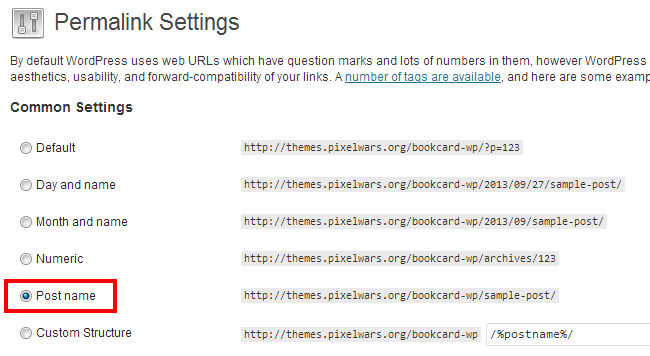
3 – If ok, then select the post name option again.
In images:
1 –
2 –
3 –
You are welcome!
Hi, please put your email to the contact form shortcode.
Thanks
Hi, you can translate them via localization. Please see Documentation > Localization.
Thanks
Hi, they are:
– js/jquery.isotope.min.js
– js/main.js
Thanks
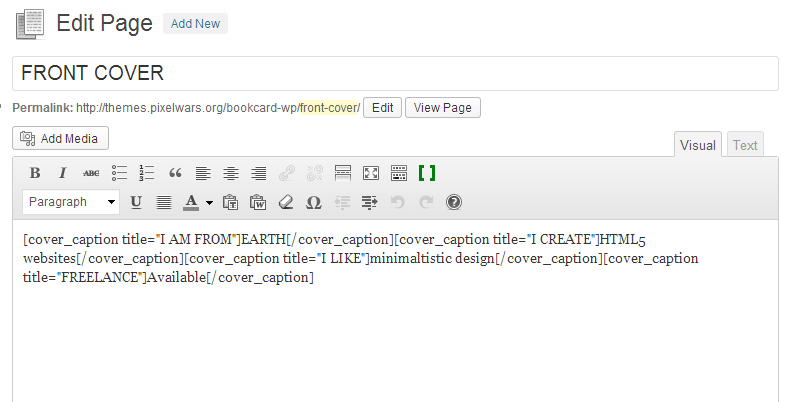
Hi, use your shortcodes as one line:
Hi,
– Use this in your External JS field:
<script> jQuery(document).ready(function($) { $( '.portfolio-items' ).isotope( 'reLayout' ); }); </script>Hi, built-in gallery allows to add images one by one. You can try Portfolio Slideshow plugin.
Thanks
Hi, there is break line in your page content. You should remove it from your content editor.
Hi, please use embed url.
Thanks
Hi, the size of this theme is a bit big (about 10MB). Some hosts do not allow over 8MB by default. But you can configure your server to increase it.
Hi, Could you try to install via WordPress admin?
Mehmet S.
Keymaster24 September 2013 at 02:48Posted in : Continue Reading Button Links to Middle of PageThank you!
Not embed code, only embed url.
– There is this watch url in your site:
http://www.youtube.com/watch?v=mcH3gneCd9o
– Use the embed format of that url, like this:
http://www.youtube.com/embed/mcH3gneCd9o
Hi, please use embed url from YouTube and from Vimeo.
Thanks
It is the contact form shortcode in your contact page.
– Add captcha to stop spams:
[contact_form captcha="yes" to="akash90gupta@gmail.com"]
Hi,
– Select post name option from your permalink settings.
– That email address is the sender domain created by the theme, not a reply address. But the reply email address of a visitor also can be included to sending email. If you receive spam emails, then use captcha=”yes” parameter:
[contact_form captcha="yes" to=""]
You are welcome!
Hi, insert more tag between content.
– See in the image:

You can download the new version directly from ThemeForest.
– The changed files between v3.8 and v3.9:
style.css
functions.php
send-mail.phpThanks
Keymaster22 September 2013 at 02:49Posted in : ivCard-Custon Page configurations for Blog?Hi,
The blog page works like a single page. So the URL ( #/blog ) is not supported for the blog page.
Use a full URL in the menu for the blog page.
Example:
Menu item name: BLOG
Menu item url: http://www.site.com/blogThanks
Note: I will improve the blog.
You are welcome!
Hi,
– Select Text Logo,
– Use this in your custom css field to add an image logo next to the text logo:
.site-title a {
padding-right: 100px;
background-position: right;
background-repeat: no-repeat;
background-image: url( 'paste-your-image-url-here' );
}
Note: Upload your image logo to the Media Library and copy the image file url.
Hi, I will improve the theme customizer in a week. Thanks for the feedback.
Keymaster20 September 2013 at 19:21Posted in : Portfolio title not showing up after update.Hi, in the new version, the portfolio title comes from an existing page. So please create a new page and select it from Theme Options > Pages > Portfolio page.
Thanks
Hi, please update to the latest version.
Thanks
Hi, add this to your custom css field:
@media (min-width: 2000px) {
.footer-text {
padding-bottom: 35px;
}}
Thanks
– Default grey color:
.social li a { background-color: grey; }– Hover color:
.social li a.facebook:hover { background-color: #3C5FAC; }You are welcome!
You are welcome!
Tried to activate the theme, but browser says a server error. So please contact your host.
Thanks
You are welcome!
Hi, select No Sidebar layout option for your blog page.
– Theme Options > Blog > Blog Type
Thanks
You are welcome!
Hi, it is because of the masonry layout future. You need to edit your main.js file. That file is in the js folder of your theme.
– Open the main.js file,
– Find the line:
layoutMode : 'masonry',
– Change it to:
layoutMode : 'fitRows',
Thanks
Hi,
– Paste this to Theme Options > Style > Custom CSS:
.footer-text {
position: absolute;
bottom: 0;
left: 0;
right: 0;
text-align: center;
padding-bottom: 15px;
}
– Paste this to Theme Options > Style > External JS:
<script> jQuery(document).ready(function($) { $('#rm-container').append('<div class="footer-text">Created by Pixelwars</div>'); }); </script>You can use http://droplr.com
You are welcome!
Hi, please re-select and save your menu after updating.
Thanks
Hi, use this in your custom css field:
body.home .comments-link,
body.home .by-author
{ display: none; }
Thanks