

Forum Replies Created
list of topics you have created till now.
-
-
I will release an update if find a solution.
Paste to Theme Settings > Style > External JS:
<script> jQuery(document).ready(function($) { if ( $( 'section' ).hasClass( 'template-name-homepage-with-slider' ) ) { $( '#logo p' ).hide(); } }); </script>– Edit the above border code:
.site-title a { border-bottom: 0px !important; }Mehmet S.
Keymaster30 April 2013 at 00:01Posted in : Change default category selection in PortfolioCheck the Isotope documentation.
http://isotope.metafizzy.coPaste to Theme Options > Style > Custom CSS:
.site-header hgroup { padding-bottom: 0px; } .site-title { margin-bottom: 0px; } .site-title a { border-bottom: 0px; } .site-description { display: none; }I don’t understand.
Paste to Theme Options > Style > Custom CSS:
.blog-masonry .page-header { width: 100%; }Uncheck “Allow comments” from “Quick Edit” menu.
Paste to Theme Options > Style > Custom CSS:
blockquote p { margin-bottom: 15px; }Paste to Theme Options > Style > Custom CSS:
.blog-masonry .entry-meta { display: block; }Set to 4:
width="4"
I don’t understand.
Paste to Theme Settings > Style > Custom CSS:
#logo p { display: none; }Use column shortcodes.
– Do not edit send-mail.php file.
– Edit below line in index.html file:
<input type="hidden" id="to" name="to" value="***@gmail.com">
I think you don’t have any experience of using WordPress.
– Publish all the items and pages :)
Only use numbers for “width” parameter:
[row]
[column width="6"]Put your content here.[/column]
[column width="6"]555Put your content here.[/column]
[/row]
Go to Settings > Permalinks:
– “Post name” option should be selected to work the theme properly.
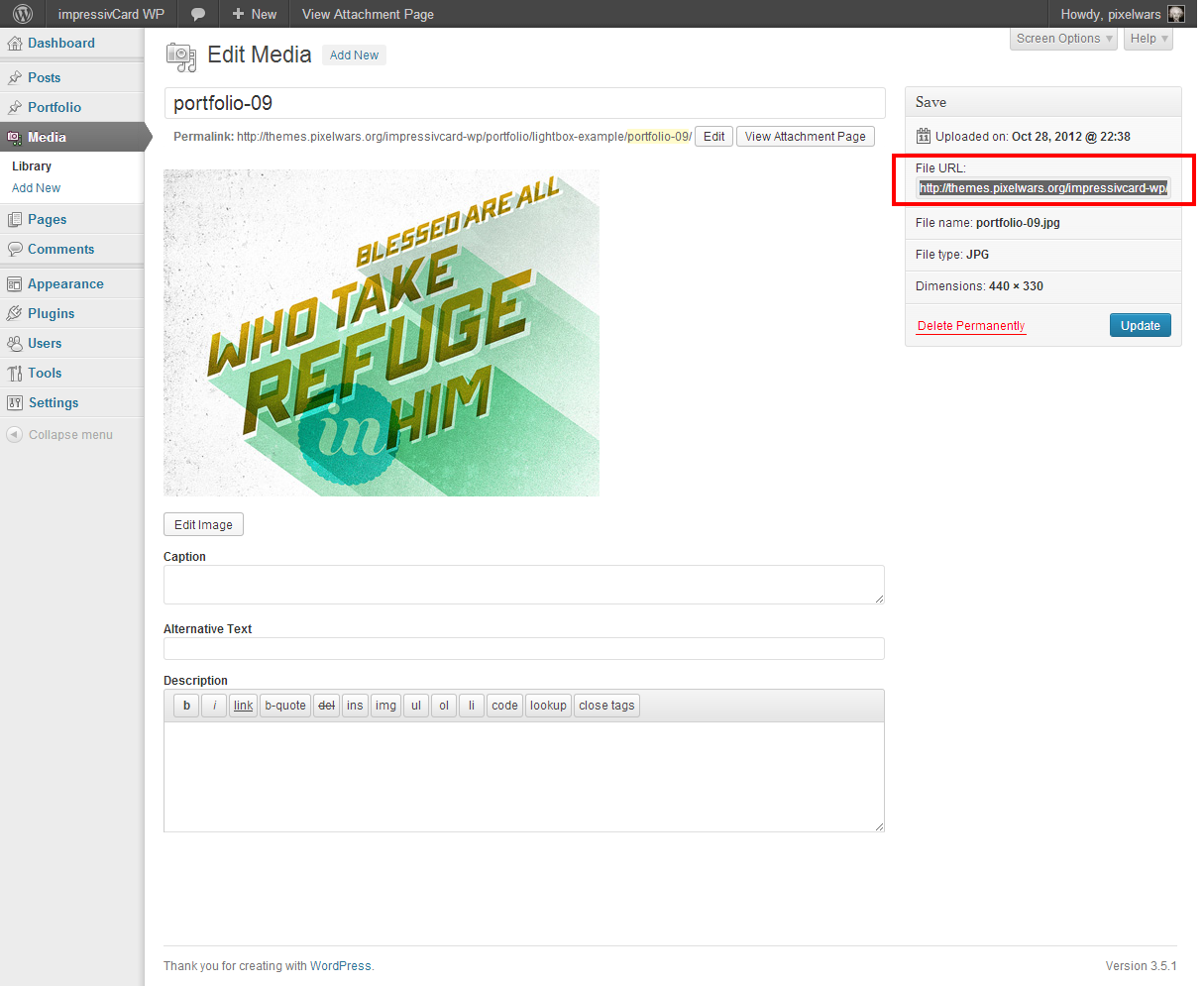
Use File URL
Paste the following codes to Theme Options > Style > Custom CSS:
– for site title and tagline
.site-title { margin-bottom: 0px; }
.site-description { margin-top: 0px; }
– for bottom of page
#main { padding-bottom: 0px; } article { padding-bottom: 0px; }Try on a real server.
Go to Documentation > Portfolio.
There is a special url re-write functionality in this template.
Good luck :)
Please do a test for our demo site in IE9 on your side:
http://themes.pixelwars.org/responsy-wpGood luck :)
– Open the help file :)
– Tab shortcodes:
[tabs]
	[tab_head]
		[tab_title active="active" title="Tab 1"]
		[tab_title title="Tab 2"]
	[/tab_head]
	[tab_content]
		[tab_pane]Tab 1 content.[/tab_pane]
		[tab_pane]Tab 2 content.[/tab_pane]
	[/tab_content]
[/tabs]

active="" ... active keyword is to define which tab is the primary

title="" ... the caption text of the tab
– Gallery is for images.
– Add YouTube videos in a portfolio item or use inline video shortcode anywhere you want.
#sidebar a:hover { background-color: yellow; }This is not easy to do with some lines of code. If you are not familiar with HTML coding you may consider working with a professional for further customization.
#sidebar a { color: green; } #sidebar a:hover { color: red; }Re-install the theme.
working :)
From rdrgmrqz
Good luck :)
.rm-container { width: 32%; max-width: 560px; }Write width where you see height.
.main-navigation ul li a { color: green; }– Open main.js file ( js/main.js ),
– Find the line:
animation: animationType,
– Add the line:
randomize: true,
– Final:
animation: animationType, randomize: true,
Fill the fields in Theme Settings > Home.
Ok, good luck.
Ok, good luck.
Paste to Theme Options > Style > Custom CSS:
h1.site-title img { max-height: 300px; }In our demo site:
Can you provide a screenshot?