

Forum Replies Created
list of topics you have created till now.
-
-
Read the documentation.
We are both talking about the same thing, but Responsy WP theme hasn’t got post formats in design.
I will release an update if find a solution.
I think you are talking about the post formats (aside, chat etc.)
Save changes after editing.
Maybe it can be done in similar way.
Did you select a department for a portfolio item?
– Documentation updated in v1.1,
– Download the package and read the Portfolio section.
@webcoag: I have no idea.
Modify php files.
Don’t use full url for your custom menu.
Check your widget location.
This is normal.
Yes, you do.
Also Facebook there is.
See the post: http://www.pixelwars.org/forums/topic/custom-css
Will submit today.
Ok, understand, add your featured images for YARPP and add a code to hide them in the blog page.
– Paste to Theme Options > Style > Custom CSS:
.featured-image { display: none; }If you don’t want the Featured image to display in the blog page, don’t add featured image to posts.
I’ve checked now the settings page and it calls Thumbnails under YARPP plugin. But not tested.
– Change top value (50) for vertical position:
a.rm-button-open { top: 50%; }– Select your font from Google Web Fonts,
– Add it to head section of your index.html file,
– And change the title font from main.css in line 418:
.cover h1 { display: block; width: 100%; margin: 0 auto; padding: .5em 0 .1em 0; text-align: center; color: #fff; line-height: 1; letter-spacing: 1px; font-size: 62px; font-family: 'Alfa Slab One'; text-shadow: 8px 7px 0px rgba(0, 0, 0, 0.1); }– In that line, change the font-family:
.cover h1 { font-family: 'Alfa Slab One'; }Try background-size property.
Select featured image option in the YARPP settings page.
Try to re-install the theme.
What do you mean about Read WP?
Catch every internal page with its id in CSS.
#resume { background-image: url( "put-your-image-url-here" ); } #portfolio { background-image: url( "put-your-image-url-here" ); } #contact { background-image: url( "put-your-image-url-here" ); }Send your info to me:
Make sure you did it correctly.
Contact me http://www.pixelwars.org/contact/
Copy media box code with its container.
Create a new page and select Portfolio template for it and add portfolio items.
Search a plugin for it at http://wordpress.org/extend/plugins
Which options did you change?
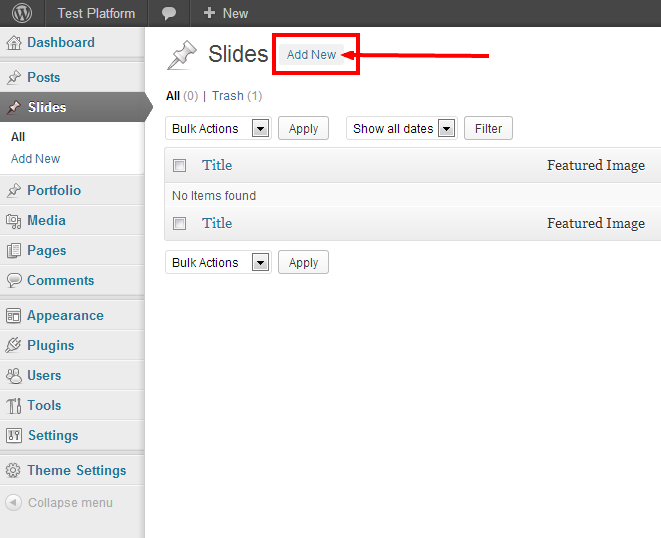
How to add a slide? See the image:
Did you read the documentation?
– Change widget order.
– Select Lightbox portfolio item type.
Paste to Theme Settings > Style > Custom CSS:
#twitter-list ul li span { background: grey; }– Use services shortcodes.
– Add new slides.
weird
Paste to Theme Options > Style > Custom CSS.
Because this theme is a one page design except portfolio items. A portfolio item has a certain full url.
Example:
[column width="12"]
	[row]
		[column width="3"]
		Put your content here.
		[/column]
		[column width="3"]
		Put your content here.
		[/column]
		[column width="3"]
		Put your content here.
		[/column]
		[column width="3"]
		Put your content here.
		[/column]
	[/row]
[/column]
Paste to Theme Options > Style > Custom CSS:
h1.site-title img { max-height: 100%; }That separated:
– see project,
– details.
Use inline slider shortcode in a column shortcode.
Example:
[column width="6"]
[inline_slider]
	[slide alt="" src=""]Put you slide title here.[/slide]
	[slide alt="" src=""]Put you slide title here.[/slide]
	[slide alt="" src=""]Put you slide title here.[/slide]
[/inline_slider]
[/column]
width=”” … 1..12
offset=”” … 1..12 or do not use
See the post:
How To Create Homepage?
http://www.pixelwars.org/forums/topic/how-to-create-homepage
