

Forum Replies Created
list of topics you have created till now.
-
-
Please see: Documentation > Localization.
How it works?
– go to Theme Settings > General > Logo,
– click the upload button and select your image logo,
– after uploading complete, select ( Alignment: None ) and ( Size: Full Size ) then click “Insert into post” button,
– save.
You can use a popular plugin.
Google XML Sitemaps: http://wordpress.org/extend/plugins/google-sitemap-generator
YARPP Style Customization
- Go to Administration > Settings > Related Posts (YARPP),
- change “Before / after related entries:” inputs like this;
- For before:
<div class="related-posts"><h3>RELATED POSTS</h3><ol> - For after:
</ol></div>
Unzip the package and find the theme under Theme folder.
Just go to Portfolio > Add New.
Which plugin?
Email newsletter: http://wordpress.org/extend/plugins/email-newsletter
[accordions]
	[accordion active="active" title="accordion 1"]Put your content here.[/accordion]
	[accordion title="accordion 2"]Put your content here.[/accordion]
[/accordions]

active="" ... active keyword is for opened style

title="" ... the caption text of the accordion
– i.e.
[accordions]
	[accordion active="active" title="This is the title1"]This is what you can see after you clicked the arrow, and hide after you click the arrow again.[/accordion]
	[accordion title="This is the title2"]Put your another content here.[/accordion]
[/accordions]
Delete permanently all the dummy content and re-import the dummy data xml file.
All theme modification should be done by using child themes not editing the theme files directly.
in the documentation.
Usage:
[lead_p]Put your content here.[/lead_p]– lead_p shortcode is similar to normal paragraph. Just has bigger font size.
I have fixed that minor localization issue. Thanks for the feedback.
Download files at http://themes.pixelwars.org/responsy-wp/wp-content/uploads/2013/03/portfolio-single-files.zip
CSS files are located under css folder. I recommend you custom css box or child theme to customize elements.
– Theme Settings > Style > Custom CSS.
We have just fixed that issue. Update is coming soon. Thanks for the feedback.
Go to Appearance > Theme Options > Portfolio > Ajax > No > Save Changes.
Twitter Widget Pro
http://wordpress.org/extend/plugins/twitter-widget-pro– Create a page,
– select it from Settings > Reading > Posts page,
– add this page to menu Appearance > Menus.Go to Settings > Reading > Front page displays > A static page > Front page > Select.
Use the title inputs:
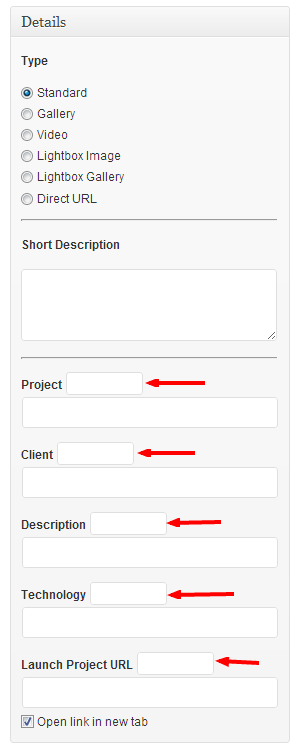
You can use inline_slider shortcode.
WordPress.org Plugin Page » http://wordpress.org/extend/plugins/twitter-widget-pro
1-) You can use a shortcode:
[cv_button text="" url=""]
2-) it is working in my site, it might be a server related issue.
[contact_form to=""]
Forget the assets, just open the help file and read the Gallery section.
Please see Documentation > Gallery.
You can remove any of menu item by clicking the red Remove link.
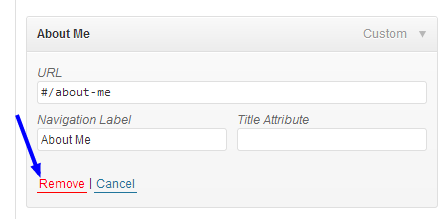
– Also see the post: http://www.pixelwars.org/forums/topic/portfolio-4
WordPress includes built-in jquery. So don’t add any external jquery. This may cause a conflict.
Which way did you prefer to include jquery v1.9 in WordPress?
The shortcode is necessary. You can learn your featured image url easily from Media > Library > Edit > File URL for url parameter of the shortcode.
– You can add a picture to content editor by using the Add Media button above the editor.
– Paste the code below to Theme Options > Style > Custom CSS box to hide the detail information of the posts:
.blog-posts .post .entry-meta { display: none; }Use the [lightbox_image] shortcode for lightbox image type portfolio item to open in a lightbox, like this:
[lightbox_image first_image="yes" title="Animal with love" url="http://themes.pixelwars.org/read-wp/wp-content/uploads/2013/02/lightbox-01.jpg"]
Help Documentation file is in the downloaded package. Please see the Gallery section in the documentation.
Unzip the downloaded package. Find the zipped theme file under Theme folder.
Go to Appearance > Themes > Install Themes > Upload.
Select your zipped theme file and install it. Activate the theme after installation completed.
This is not possible by default, needs more further customization, you may consider working with a professional, if you are not familiar to WordPress coding.
You can use Contact Form 7 plugin.
– Add portfolio items,
– Create a new page with name portfolio and select it from the portfolio widget.
– Create a custom menu,
– Add a custom link to the menu for the portfolio page from the Custom Links box ( not Pages box ),
– in the Custom Links box, write Portfolio ( or what you define for your portfolio page title ) to the Label input, then clear the URL input and define a special url for your portfolio page in the URL input which begins
#/after that write your portfolio page’s slug name.For example:
– my portfolio page’s name is Portfolio and its slug name is portfolio, so the special url must be#/portfolio– to learn the right slug name of a page, go to Pages > see page list > find your wanted page row > click Quick Edit link > copy the slug name of the page from its input where right side of the slug title.
Final product is:
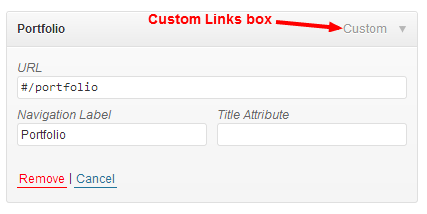
All custom css codes goes to Theme Options > Style > Custom CSS area. And put the inline slider shortcode to the content editor of any page or post.
I don’t understand.
What kind of changes do you want to do in source code?
I will do a test for this.
Use portfolio widget with its right position parameters as described in the documentation.
Link color options are for content links, not for titles. Use custom css to change them.
– Paste to Theme Options > Style > Custom CSS;
Title color:
h1 a { color: #1e73be; }Title hover color:
h1 a:hover { color: #749bbf; }Which black text? Titles?
I’ve checked your site, your new color choices are blue faced. I think it is working fine.
It might be cached. Reload the page.
We have fixed it and it will be ok on next update but at this time you can manually edit it.
See the post: http://www.pixelwars.org/forums/topic/facebook-share-link-missing( …/portfolio/sub-url )
Because the sub-url of the link is only for portfolio items. Don’t put portfolio page as a parent of any page. If you want to make a second level menu item with a page under portfolio create a custom menu. ( Documentation > Menu )
