

Forum Replies Created
list of topics you have created till now.
-
-
Can you provide your url?
Alright then. You can use the contact form for a private message.
Hi, use this in your custom css field:
body.page .entry-header { display: none; }Every post/page has a “Quick Edit” link when you hover in the editing list. Click it to open “QUICK EDIT” menu, then uncheck the “Allow Comments” option.
Test them one by one.
At the bottom of the regular posts or top?
You should choose a blog type. Only one blog type can usable at a time.
Did you hide the toggles? I can’t see them.
Did you include the unwanted category ids to the code? The numbers in my code are samples. They are not yours.
Can you provide your URL?
Every post/page has a “Quick Edit” link when you hover in the editing list. Click it to open “QUICK EDIT” menu, then uncheck the “Allow Comments” option.
Ok. Good luck.
Can you provide a screenshot?
You need to add the
#character to your menu.See in the image:
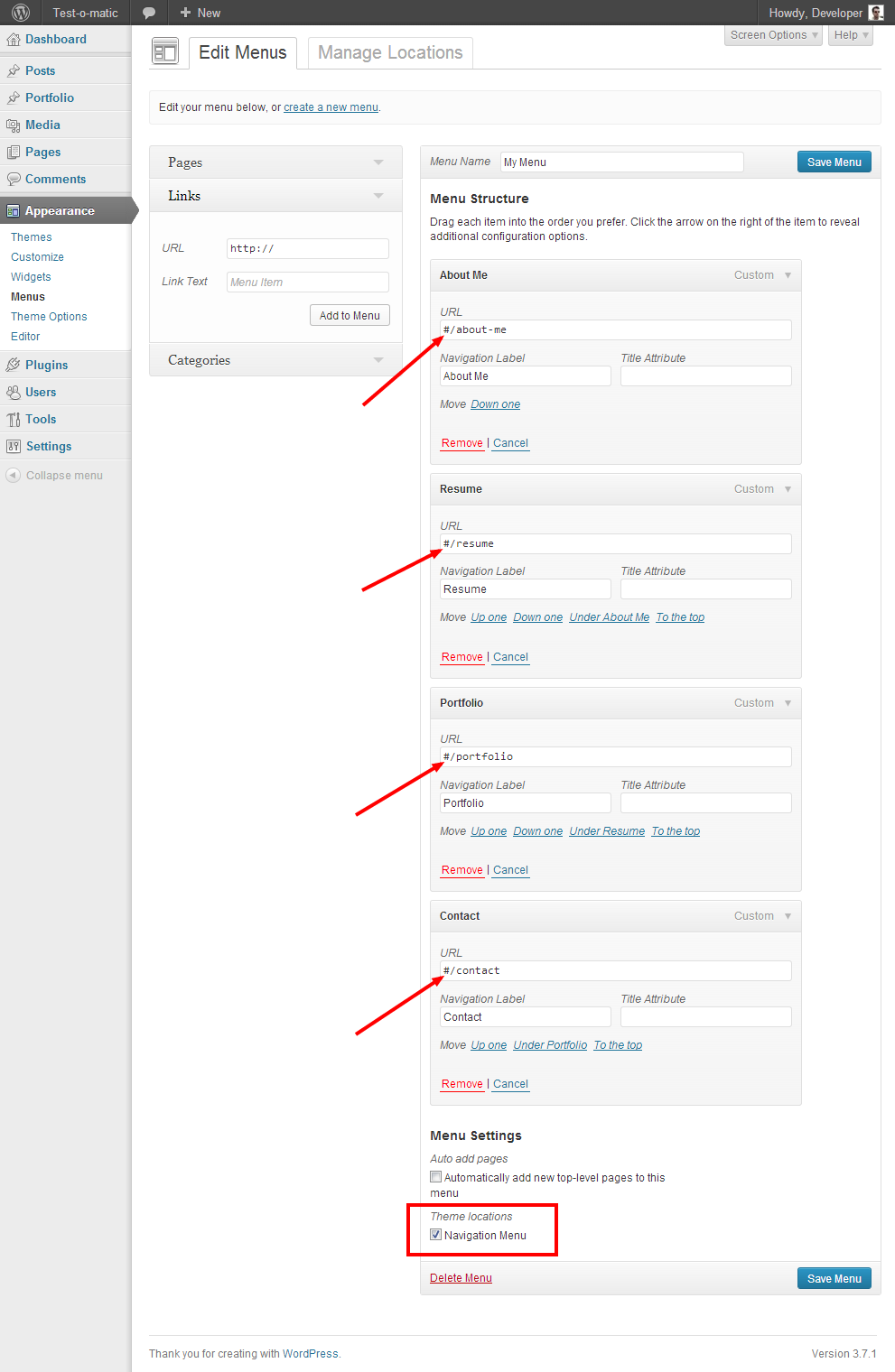
Hey, something wrong in your custom menu. Please check the “Menu” section in your theme documentation. You can download it from ThemeForest.
Thanks
You are welcome!
Mehmet S.
Keymaster18 November 2013 at 23:20Posted in : Removing "posted in…Date… comments" on all pagesYou are welcome!
Hi, use this in your custom css field:
h1.site-title a,
.entry-meta a,
.entry-content a.more-link,
.navigation a,
.nav-single a { border-bottom: none; }
Thanks
Can you provide your url?
Hi, please update to the latest version. You can download it from ThemeForest.
Thanks
Keymaster18 November 2013 at 14:06Posted in : Removing "posted in…Date… comments" on all pagesFirstly, update to the latest version. You can download it from ThemeForest.
– Use this:
.post-date { display: none; }Thanks
Download a fresh copy from ThemeForest, then try again.
Note: After updating, check your custom widgets. Sometimes they go to the Inactive Widgets place with their settings.
Hi, use this in your External JS field:
<script> jQuery(document).ready(function($) { var entry_meta = $( 'body.single .entry-meta' ); $( 'body.single article' ).append( entry_meta ); }); </script>Keymaster16 November 2013 at 04:09Posted in : Foodie Bookmarklet Doesn't Work With The ThemeI will check this in a week.
Can you provide your url?
You can edit the files in another way.
– Go to your FTP, then edit the files.
OR
– Unzip the theme, then edit the files.
Custom css:
body.blog .featured-image { float: left; padding-right: 30px; }Hi, your custom menu is over there in your admin. You just need to save your existing menu for the navigation menu location.
Thanks
I think you didn’t see the theme documentation. You can download it from ThemeForest.
Thanks
Hi, use this in your custom css field:
.entry-meta { display: none; }Thanks
You can find it in your single-portfolio.php file (Appearance > Editor > single-portfolio.php).
You are welcome!
Edited:
body.blog .featured-image img { max-height: 50%; width: auto; }Hi, use this in your custom css field:
.featured-image img
{
max-height: 50%;
width: auto;
}
Thanks
Hi, you can change your blog layout from Theme Options > Blog > Blog Type.
Thanks
Hi, use this in your custom css field:
.featured-image img
{
-webkit-transition: all 0.3s ease-out;
-moz-transition: all 0.3s ease-out;
-o-transition: all 0.3s ease-out;
transition: all 0.3s ease-out;
}

.featured-image img:hover
{
opacity: 0.7;
filter: alpha(opacity=70);
}
Thanks
Keymaster15 November 2013 at 22:35Posted in : Removing "posted in…Date… comments" on all pagesHi, use this in your custom css field:
.post-category,
.comments-link { display: none; }
Thanks
The new version is available! You can download it from ThemeForest.
Thanks
You are welcome!
Keymaster14 November 2013 at 14:43Posted in : Delete Comments / Post Formats Standard / jsYou are welcome!
Hi,
1 – Exclude Categories (From The Blog):
– go to Appearance > Editor > functions.php.
– find this line:
$args_recent_posts = array( 'post_type' => 'post', 'posts_per_page' => $number_of_posts_to_show );
– edit:
$args_recent_posts = array( 'post_type' => 'post', 'posts_per_page' => $number_of_posts_to_show, 'cat=-12,-34,-56' );
2 – Exclude Categories (Blog page):
– go to Appearance > Editor > index.php.
– find this:
<?php
if ( have_posts() ) :
– edit:
<?php
query_posts( 'cat=-1,-2,-3' );
if ( have_posts() ) :
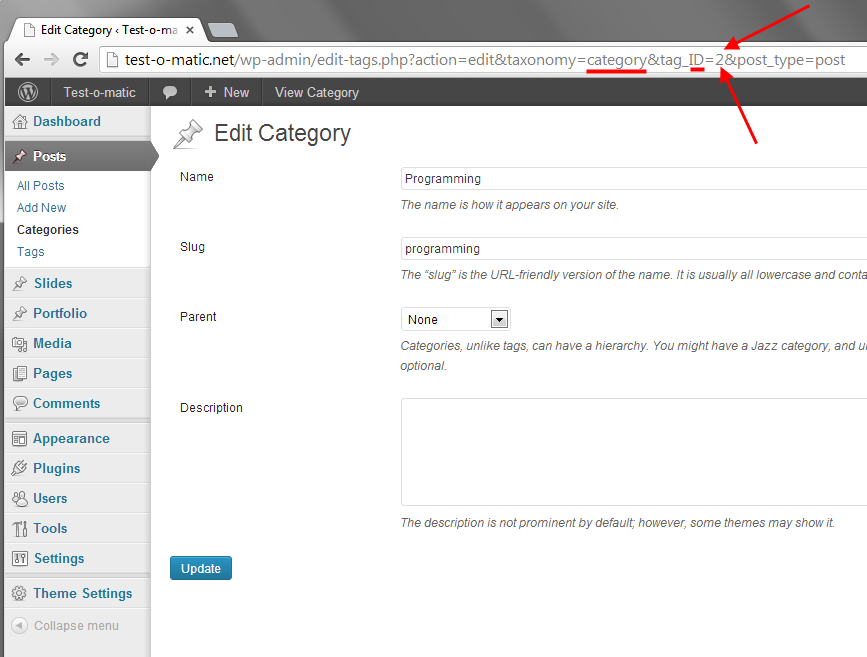
Note: The numbers are category ids. You can find a category id in your edit screen.
See in the image:
You are not using the built-in portfolio functionality. Please check the “Portfolio” section in the theme’s documentation. You can download it from ThemeForest.
Sorry, I’m not exactly sure what you’re asking?
Keymaster14 November 2013 at 03:31Posted in : Delete Comments / Post Formats Standard / jsEvery post/page has a “Quick Edit” link when you hover in the editing list. Click it to open “QUICK EDIT” menu, then uncheck the “Allow Comments” option to hide the form at the bottom of a page.
You are welcome!
Here is:
[drop_caps]
some stuff here
[/drop_caps]
Thanks
You are welcome!
@andreeam: You can use this in your custom css field to hide that text without selecting any extra style option.
.media-box .mask .title { display: none; }Thanks