

Forum Replies Created
list of topics you have created till now.
-
-
Paste to Theme Options > Style > Custom CSS:
header #site-navigation { display: none; }Paste to Theme Options > Style > Custom CSS:
.site-title { text-align: left; }Thanks.
1-)
– try the image logo uploader: Theme Options > General > Logo,
– if you want to hide the tagline, paste the code below to the Theme Options > Style > Custom CSS box:.site-description { display: none; }2-)
– use the [lightbox_image] shortcode for lightbox image type portfolio item to see a pop-up, like this:
[lightbox_image first_image="yes" title="Animal with love" url="http://themes.pixelwars.org/read-wp/wp-content/uploads/2013/02/lightbox-01.jpg"]
3-)
– go to Pages and click Quick Edit link of your portfolio page,
– uncheck Allow Comments.1-) Rescan the theme with Codestyling Localization plugin to include the SHARE word to the .po file.
2-) YARPP style solution:
– go to Settings > Related Posts (YARPP),
– change “Before / after related entries:” inputs like this;
– for before:
<div class="related-posts"><h3>RELATED POSTS</h3><ol>– for after:
</ol></div>I don’t understand. Please explain more.
Yes you can.
– go to Appearance > Editor > homepage-with-portfolio.php
– find the line below:$args_portfolio = array( 'post_type' => 'portfolio', 'posts_per_page' => -1 );
– change the -1 value as 20, 15, 10 etc.
– e.g.$args_portfolio = array( 'post_type' => 'portfolio', 'posts_per_page' => 15 );
I will do a test for this.
– Check the checkbox “Download and import file attachments” after importing dummy data then click Submit.
Please see: Documentation > Install.
– Please see: Documentation > Shortcodes > Social Icons.
[social_icons]
	[social_icon type="facebook" title="" url="http://www.facebook.com/username"]
	[social_icon type="twitter" title="" url="http://twitter.com/username"]
[/social_icons]
Please see: Documentation > Install > WordPress Settings > Permalink Settings.
1-) First Help
– in the Visual tab of the editor:
[intro]
Hi! I am a [label]theoretical physicist[/label] developed the general theory of relativity, effecting a revolution in physics.
[launch_button text="VIEW PORTFOLIO" url="http://themes.pixelwars.org/read-wp/portfolio"]
[/intro]
– in the Text tab of the editor like this:
[intro]
<h2>Hi! I am a [label]theoretical physicist[/label] developed the general theory of relativity, effecting a revolution in physics.</h2>
[launch_button text="VIEW PORTFOLIO" url="http://themes.pixelwars.org/read-wp/portfolio"]
[/intro]
2-) Second Help
– Go to Appearance > Editor > page-home.php
– Find the line below:$args_homepage = array( 'post_type' => 'post', 'posts_per_page' => -1 );
– The mean of
-1is unlimited. So you can change it 5, 10, 15, 20 or what you want.Mehmet S.
Keymaster21 February 2013 at 17:22Posted in : How to asign department to a menu category.Go to
Appearance > Menus > Screen Options > DepartmentsGo to Settings > Permalinks > Common Settings > Default > Save Changes.
impressivCard WP theme has its own dribbble social icon. Why didn’t you use it?
Please see: Documentation > Shortcodes > About Me Page Shortcodes.
Keymaster20 February 2013 at 13:35Posted in : Leave a comment before potfolio detail in mobileWe will try to fix this issue. Thanks for the feedback.
It is weird, I have more than 15 portfolio items on my test platform and the portfolio page is working nice.
You must adjust the custom menu and widgets after importing the dummy data. Please read carefully the Menu and Widgets sections in the documentation.
– Go to Appearance > Editor >
format-standard.php– Find the line below:
the_content( __( 'Continue reading <span class="meta-nav">→</span>', 'read' ) );
– Change it like this:
the_excerpt();
– Do this changes to other post format files if you are using them:
format-aside.php
format-audio.php
format-chat.php
format-gallery.php
format-image.php
format-link.php
format-quote.php
format-status.php
format-video.phpKeymaster18 February 2013 at 00:01Posted in : Leave a comment before potfolio detail in mobileIt is weird, there is no problem on my test platform. Provide online url or screenshot to check.
Because it has full url. Set it up only with end of the url like this:
– Now:
http://www.betekstenis.be/#/contact– Change it to:
#/contactNote: Do it by navigating to Appearance > Menus but firstly see the Menu part of the documentation.
It is not possible for gallery slider, but you can add images to editor and they will be placed under the slider.
Thanks.
Upload your bg image from its option: Theme Settings > General > Background Image
Please see: Documentation > Widgets.
Keymaster11 February 2013 at 14:47Posted in : Homepage Widgets – hide description column?Paste to Theme Settings > Style > Custom CSS:
.blog-part { display: none; }Please see: Documentation > Menu.
– Use Custom Links box instead of Pages box.
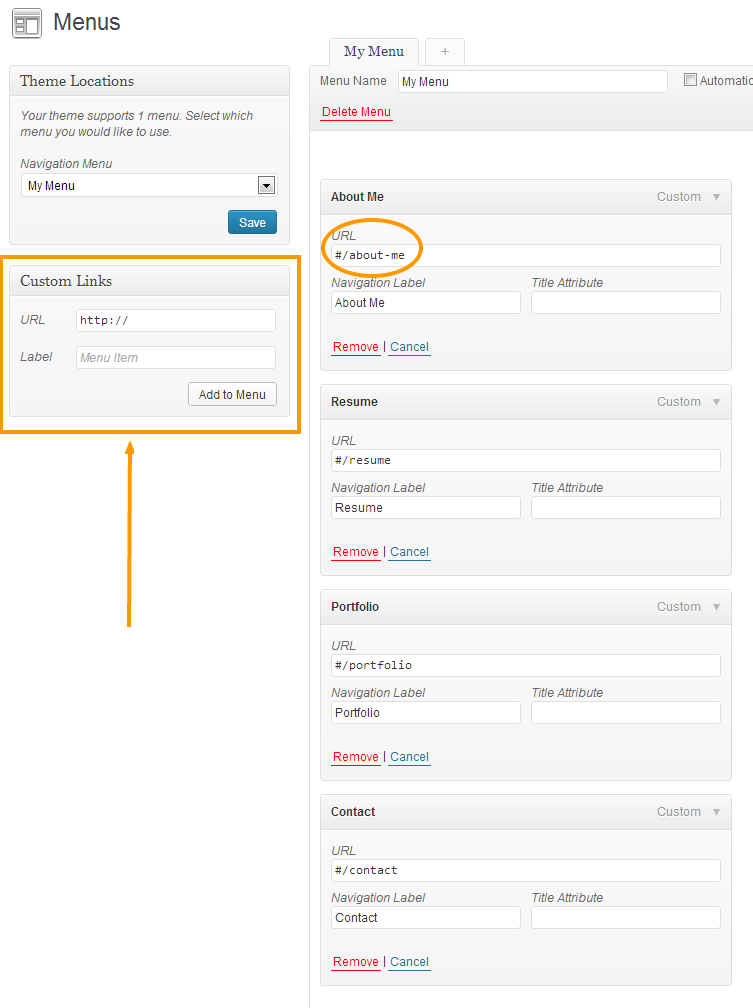
Use Custom CSS box to add css codes ( Theme Settings > Style > Custom CSS ),
How to Change Fonts?
– Select your font from google web fonts: http://www.google.com/webfonts
– Click “Quick-use” link,
– Find “@import” tab and copy @import code like this:
@import url(http://fonts.googleapis.com/css?family=Cuprum);
– Find “Integrate the fonts into your CSS :” title and copy font-family code like this:
font-family: "Cuprum", sans-serif;
– Go to Theme Settings > Style > Custom CSS box and paste your codes like this:
firstly paste this code:
@import url(http://fonts.googleapis.com/css?family=Cuprum);
for h1 heading paste this code:
h1 { font-family: "Cuprum", sans-serif; }for h2 heading paste this code:
h2 { font-family: "Cuprum", sans-serif; }for h3 heading paste this code:
h3 { font-family: "Cuprum", sans-serif; }for h4 heading paste this code:
h4 { font-family: "Cuprum", sans-serif; }for h5 heading paste this code:
h5 { font-family: "Cuprum", sans-serif; }for h6 heading paste this code:
h6 { font-family: "Cuprum", sans-serif; }Note: Please create new topics for your other questions.
–
inline_videoshortcode changed. Please see the documentation.P.S. : Sorry for the delay. There is a minor problem in our notification system. We are working to fix it.
Keymaster9 February 2013 at 12:43Posted in : Responsy Social Media Icons Widget not workingEnter full url.
e.g.
http://twitter.com/usernameCreate a custom nav menu, but not your way, only one type menu linking works. It has #. Please read carefully the Menu section in the documentation.
Patua One
Use the script code that providing by google analytics, like this;
<script>
// some stuff here...
</script>
P.S. : Only use one of them, for head or for body, they are same.
Theme Options > Animation > Always Show Scrollbar
I have checked your site, below parts were incorrect:
– x-axis value in the portfolio widget,
– menu url linking for a page,
– not saved the custom menu from the Navigation Menu list in the Theme Locations box,
– # character is required for this theme. Do not remove any of the # from the custom menu as it is used by the theme for proper function!
These all are described in the help documentation. Please be careful while looking.
Yes, it is. They are shortcodes. Use them where you want.
Thanks for the feedback. We have planned to improve the documentation fully.
Don’t use the # character in the page creating area and quick-edit section, use it only to create navigation menu links. Please see the Menu section in the documentation.
We will improve for seo.
Yes, there is an archive page template like sitemap. Create a page with Archive template.
I see the text widget is used. Switch it to 1 numbered Responsy Editor Content widget.
Theme Settings > Style > Custom CSS:
.main-slider .flex-direction-nav { display: none; }– We will improve the documentation.
– Please see:
How To Create Homepage?
http://www.pixelwars.org/forums/topic/how-to-create-homepageHow To Create CTA?
http://www.pixelwars.org/forums/topic/how-to-create-ctaPlease see:
How To Create Homepage?
http://www.pixelwars.org/forums/topic/how-to-create-homepageGo to
Theme Settings > Blog > Disable Search Module In The Full Width Page TemplateCheck the documentation.
Pinterest is supported in the latest version.
Create a page with page template Contact.
Go to WP Admin > Settings > Permalinks:
– Select Default option and save,
– Go to Admin > Portfolio,
– Click the View link for each portfolio item ( this way is important, do not check this step in front side of your site ),
– If your portfolio item’s content displayed it solved ( this is about wordpress core ),
– Go back to Permalinks and select Post name option then save.
h3 { font-weight: normal; }