

Forum Replies Created
list of topics you have created till now.
-
-
Hi,
1) If you want to make pagination for your recipes page, you must set your permalinks to plain. (Plugin related issue)
Second page: https://www.thai-mat.no/?page_id=37&paged=2
2) Debug mode is enabled in your site. It is not recommended in a live site. You just need to disable debug mode (WP_DEBUG) in your site for any notice message. More information
Hi, the files under “Additional files found” are helper for built-in plugin installation functionality. You can translate any of text in the theme with creating a new language by clicking on “Oliver” theme under Loco plugin. Translation works when you create same language for your locale: WP Admin > Settings > Site Language. Thanks
Site Language: “English (United States)” — AND — Loco > Oliver > “English (United States)”
Site Language: “Spanish (Spain)” — AND — Loco > Oliver > “Spanish (Spain)”
The notice message is related to Cooked plugin. Please contact plugin author. Thanks
Hi, I will make some tests on this issue and try to realize what causes the problem. I let you know when I come up with a solution. Thanks for the feedback.
Hi, just localize LearnPress plugin with Loco Translate. Choose “System” location for your files when creating new one. Thanks
See screenshots: Screenshot 1, Screenshot 2
Mehmet S.
Keymaster10 October 2019 at 17:41Posted in : SHORTCODES does not work – it displays as text.Display Posts plugin is working fine with the theme. But the support page you provided is a WordPress.Com page which is a different platform. You can use Jetpack plugin for some features. Thanks
Keymaster9 October 2019 at 16:38Posted in : SHORTCODES does not work – it displays as text.Hi, I will make some tests on this issue and try to realize what causes the problem. I let you know when I come up with a solution. Thanks for the feedback.
Hi,
Probably your problems are related to your local environment. Try the theme with a server on the web.
Thanks
Just fixed the issue on your site. Tried “Sync” function for template firstly. Thanks
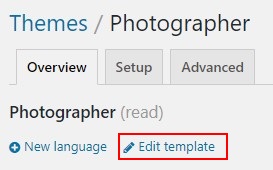
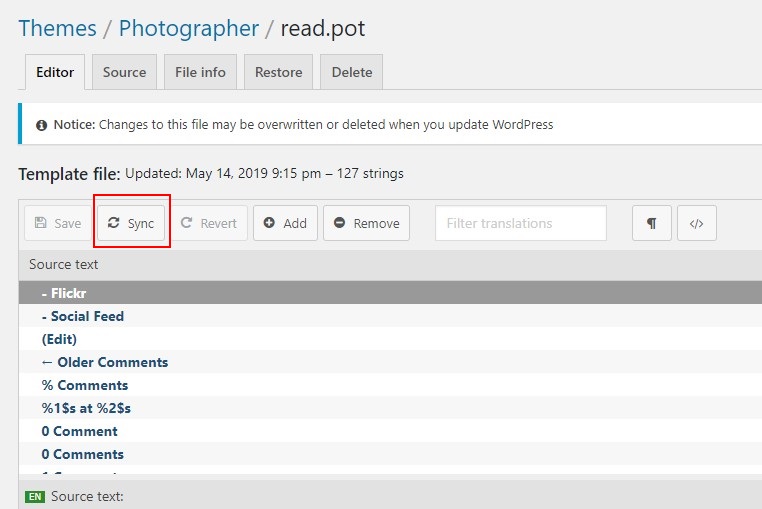
Hi, I will make some tests on this issue and try to realize what causes the problem. I let you know when I come up with a solution. Thanks for the feedback.
Hi, that php extension is not required and php memory should be 128 MB at least. Thanks
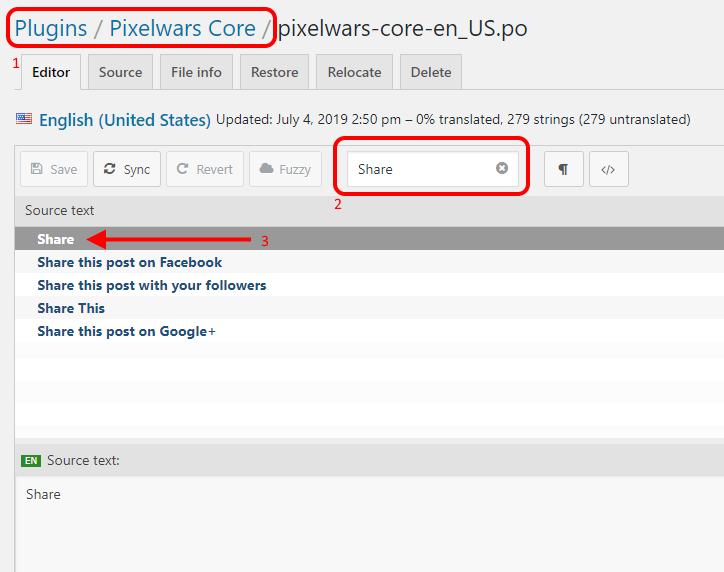
Hi, you can translate them within “Pixelwars Core” plugin. Thanks
You can create a new page easily to make it homepage under Pages menu in your dashboard.
1-) You can find your Reading Settings under Settings menu.
Screenshot:
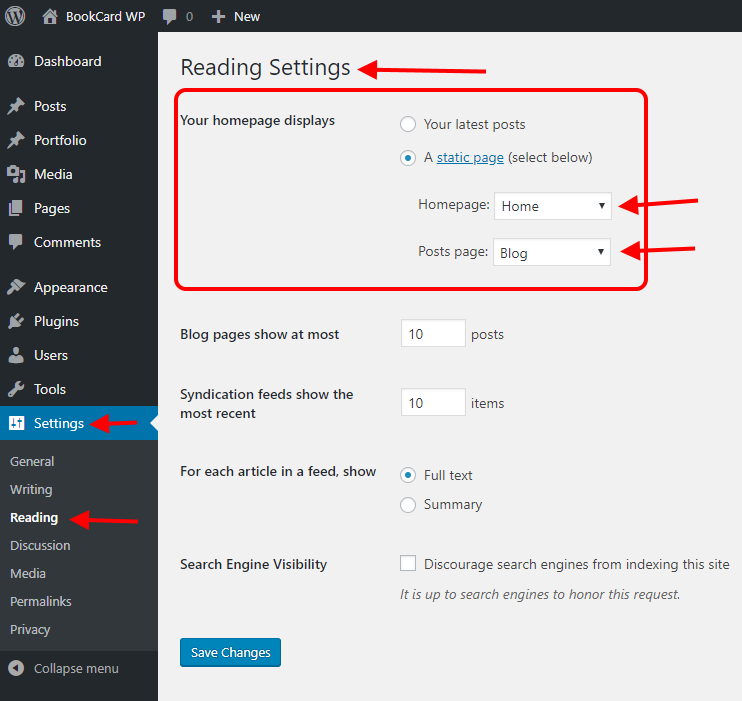
2-) I mean page edit screen.
Screenshot:
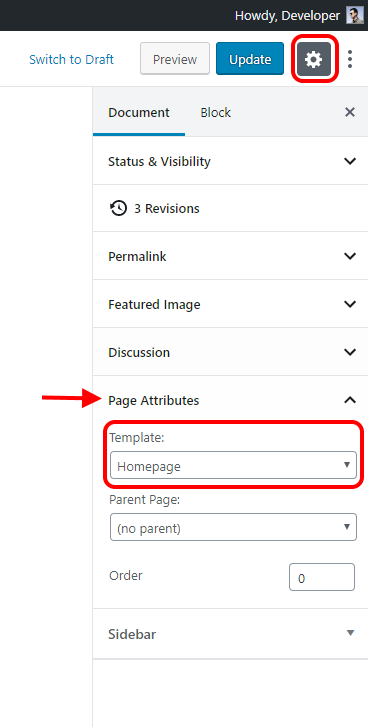
Hi,
For the latest version of the theme, just set your homepage and blog page from Reading Settings.
Don’t forget to choose “Homepage” template for your homepage in edit screen.
Thanks
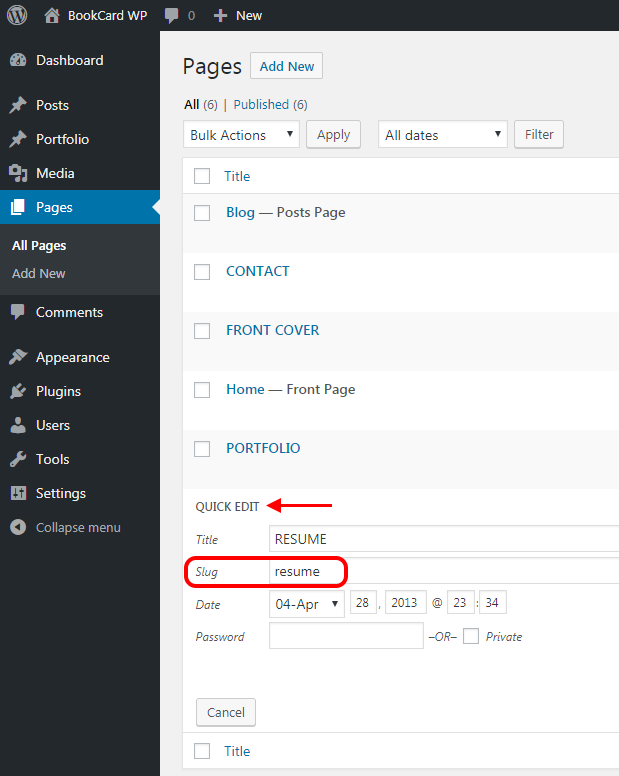
Hi, it is working now on your site. Just changed the page slug from Quick Edit menu. Thanks
You can choose using a child theme. Child theme inherits the functionality and styling of the parent theme. Child theme is the recommended way of modifying the parent theme.
Hi, I will make some tests on this issue and try to realize what causes the problem. I let you know when I come up with a solution. Thanks for the feedback.
Hi, a changelog is available for improvements on theme features, not theme files directly. Thanks
Just tested the theme with the plugins Polylang and Loco Translate, and everything goes fine on my side. Thanks
Hi, I will make some tests on this issue and try to realize what causes the problem. I let you know when I come up with a solution. Thanks for the feedback.
Hi, I will make some tests on this issue and try to realize what causes the problem. I let you know when I come up with a solution. Thanks for the feedback.
Hi,
You can change your page slug from “Quick Edit” menu. Thanks
Screenshot:
 Keymaster7 February 2019 at 21:57Posted in : Default theme demo data doesnt look like preview
Hi, I will make some tests on this issue and try to realize what causes the problem. I let you know when I come up with a solution. Thanks for the feedback.
Hi,
– Go to Appearance > Theme File Editor,
– Open functions.php file (Theme Functions),
– Add the below code to the end of the file.
– Only change portfolio word in the line: ‘slug’ => ‘portfolio’,
– Save changes.function theme_update_portfolio_slug($args, $post_type) { if ('portfolio' === $post_type) { $new_args = array( 'rewrite' => array( 'slug' => 'portfolio', 'with_front' => false ) ); return array_merge($args, $new_args); } return $args; } add_filter('register_post_type_args', 'theme_update_portfolio_slug', 10, 2);– Go to your Settings > Permalinks page, and refresh your permalink settings.
Thanks
Keymaster25 December 2018 at 22:32Posted in : H1 tag on the logo for every page = Bad for SEOHi,
You can use any css code at the end of the style.css file of your activated child theme.
But your parent theme customizer styling settings overrides css codes of style.css file for related styling options. So you should use customizer first for style customizations.
If you want to make more style customization, use Additional CSS field in customizer or try css !important rule in your child theme to override customizer styling options.
For overriding “functions-header.php” file, duplicate it to your child theme folder and point the file path from child thme’s functions.php file.
Thanks
Hi, the Pixelwars Core plugin is inside the theme. You can install it from Appearance > Install Plugins. Then the custom widgets will be listed in the widgets page. Thanks
Screenshot:


Hi, we have released a new update with the fix, you can download and update your theme now.
https://themeforest.net/user/pixelwars/portfolio
—
New option for that:
Appearance > Theme Options > Portfolio > Custom URL Structures
Hi, tested the theme with its child theme and there is no issue on my side. Maybe a temporary plugin related issue caused for you. Thanks
Tested the theme. They are in the list. See screenshots:


Hi,
I will make some tests on this issue and try to realize what causes the problem. I let you know when I come up with a solution.
Thanks for the feedback.
Keymaster9 December 2017 at 20:28Posted in : Feature Request: Custom Sort Order To PortfolioHi,
You can try the following plugin.
Post Types Order: https://wordpress.org/plugins/post-types-order/
Thanks
Please send admin access to me. I will check your site.
Send with @mehmetsali and topic url to http://www.pixelwars.org/contact/
Hi,
All words are included to translation file. You can see all of them in the translation screen of Loco Translate plugin.
Thanks
Screenshot:

The theme will update your database for improvements when you change the main style to another one. Then you can back to your style again. This will fix the wrong url syntax.
Hi, we have made some changes for the main style option in back side. So, the long url related to it. Just play with the main style in customizer, and save. Thanks
Hi, you can download the plugin from GitHub page: https://github.com/hchouhan/I-Recommend-This Thanks
Hi, you can use the new default widget “Custom HTML”. Thanks
Hi, it is weird on your site. Just tested the theme in our server, the sample data importing is working fine on our side. Don’t worry it is easy to create your pages with step by step instructions as described in theme documentation. Thanks
Hi, based on this page https://github.com/bluehost/endurance-page-cache I’d say it’s a plugin from BlueHost, probably installed as an MU plugin. If you have questions about it, please contact their tech support. Thanks
Hi, set “Link To = None” from display settings for your images to see img result. Thanks
Hi, tested the theme, it is safe to update to WordPress 4.8. Thanks
Hi, I just fixed the issue on your site by updating the WordPress to the latest stable version. Thanks
Hi, we have just released a new update with the fix, you can download and update your theme now.
Hi, we will improve the “Related Posts” functionality with the next update. Thanks for the feedback.
Hi, we will improve the excerpt functionality. Thanks for the feedback.