

Forum Replies Created
list of topics you have created till now.
-
-
Thanks for the sharing!
Resolved. You can download the new version from ThemeForest.
Thanks
The new version is available!
Hi, comment avatars come from gravatar.com.
Thanks
Hi, please download the theme’s documentation from ThemeForest, then chack the “Gallery” section.
Thanks
Hi,
– install the new version in the regular way.
– “Theme Options” will not be affected. They are in your database.
Thanks
Hi, you can add a meta tag to “Theme Options > SEO > Tracking Code (/head)” box.
Thanks
You are welcome!
Hi, you can use the column shortcode.
Example:
[column width="6"]
	Put your content here.
[/column]
[column width="6"]
	Put your content here.
[/column]
Hi, check the steps in this image:
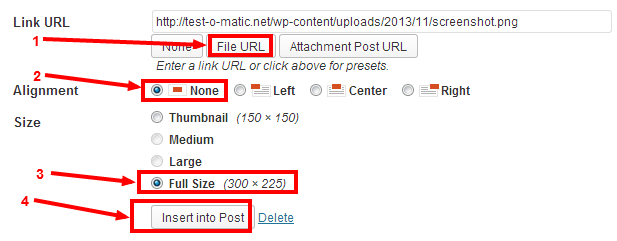
Every post/page has a “Quick Edit” link when you hover in the editing list. Click it to open “QUICK EDIT” menu then uncheck the “Allow Comments” option.
Hi, please re-scan the files and try again.
Thanks
Note: Ignore that message.
Mehmet S.
Keymaster7 November 2013 at 19:06Posted in : Issues installing update from v2-3-2 to v3-1Hey,
– You can get your ftp info from your host.
– You can use FileZilla client to send your language files to your ftp.
– The changes of the Theme Options will not be affected. Because they are in your database. Your edited .php or .css or .js files will be restored to default. So all theme modification should be done by using child themes not editing the theme files directly. ( http://codex.wordpress.org/Child_Themes )
I will do a test in a week.
Sorry, this is not possible by default, needs more further customization, you may consider working with a professional, if you are not familiar to WordPress coding.
Thanks for the feedback.
Keymaster6 November 2013 at 02:59Posted in : Issues installing update from v2-3-2 to v3-1Hi,
– Install the zipped theme file in the regular way on your wp admin. Then go to your ftp and change the language files if you need.
OR
– Unzip the theme and copy-paste your language files, then zip it with WinRAR. Finally install and activate via your admin.
Thanks
You are welcome!
Ok, I will try to release an update for this in this week. Thanks for your patience.
Yes it is. Go to your Menus page in your admin and add your date archives to your menu.
Thanks
You can change the content showing function to excerpt showing. Open the format-standard.php file, replace the the_content function with the the_excerpt function.
You are welcome!
You are welcome!
Alright then. I will do a test with that plugin soon. Keep an eye on ThemeForest page for updates.
Thanks
Hey,
a) Theme Options > Blog > About The Author Module.
b) Use this in your custom css field:
.form-allowed-tags { display: none; }c) You can search a plugin for it.
Thanks
Hey, first of all you had made a mistake about the Twitter widget. Don’t use any url or twitter username. Just do the steps under the part of Twitter in the customization section of the theme’s documentation.
– About your issue, I will check your site again tomorrow.
Thanks
Can you provide your URL?
Hi, I will fix this issue and will release an update in a few days. Thanks for the feedback.
Hi,
– create a category FOOD,
– add this category to your menu like a page,
– write your post under that category.
Thanks
You are welcome!
Hi, please update to the latest version. You can download it from ThemeForest.
Thanks
Hi,
@laurahuet93: Create a new page with Default Template and select it from the static front page option under Settings > Reading. This is the regular way to adjust a static page for the homepage.
@evobulgarevo: There is no pagination functionality for that page.Thanks
Hi, I mean the installed plugins on your WordPress admin.
Hi, it is still in progress but at this time you can add a simple blog page with sidebar. Then you can place the Custom Menu widget to the sidebar for navigation in pages.
Thanks
@kt_user: Thanks for your helpful messages.
– The new update notifications for themes in the WordPress admin are only for the free themes by providing WordPress.org theme directory.
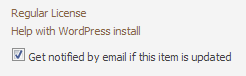
– If you want to receive a new version message for the ThemeForest themes, then check the notification option. You will find it in your download menu on ThemeForest.
See in the image:
– Just tested again the theme on my host. The contact form working fine. I think this a server related issue. So, please contact your server people and let us know what we must do exactly. Maybe your servers allow only SMTP connections for sending mails. If so, this the problem. Because this theme sends mail via the PHP mail() function.
Note: I will try to add a SMTP option.
Note 2: At this time you can use the Contact Form 7 plugin for a temporarily solution. (Use that plugin with any of SMTP plugin if needed. You can get your smtp info from your host)
Thanks for your patience.
Can you provide your URL?
Thank you!
Hi, you can add the
new_tab="yes"parameter to your button shortcode.Thanks
Hi, visited your link and it is not the Read WP theme.
Thanks
Hi, please update to the latest version.
Thanks
Hi, just checked the links. Seems you did it.
You are welcome!
Hi, you can change it from theme options:
– Theme Options > Fonts > Text Logo Font Size
Thanks
You are welcome!
Please see this post http://www.pixelwars.org/forums/topic/social-media
Thanks
Paste my custom css codes to the Custom CSS box under Theme Options > Style > Custom CSS.
Hey, use this in your custom css field:
.widget_pretty_pinterest_pins ul li:before { content: ""; }– to make two columns thumbnails:
.widget_pretty_pinterest_pins ul li { display: inline-block; }Thanks
Hi, for the image at this link http://d.pr/i/Q6Ka the masonry layout doesn’t allow different heights images to show them well. So all of the images in a gallery post must be have same height.